
Menus
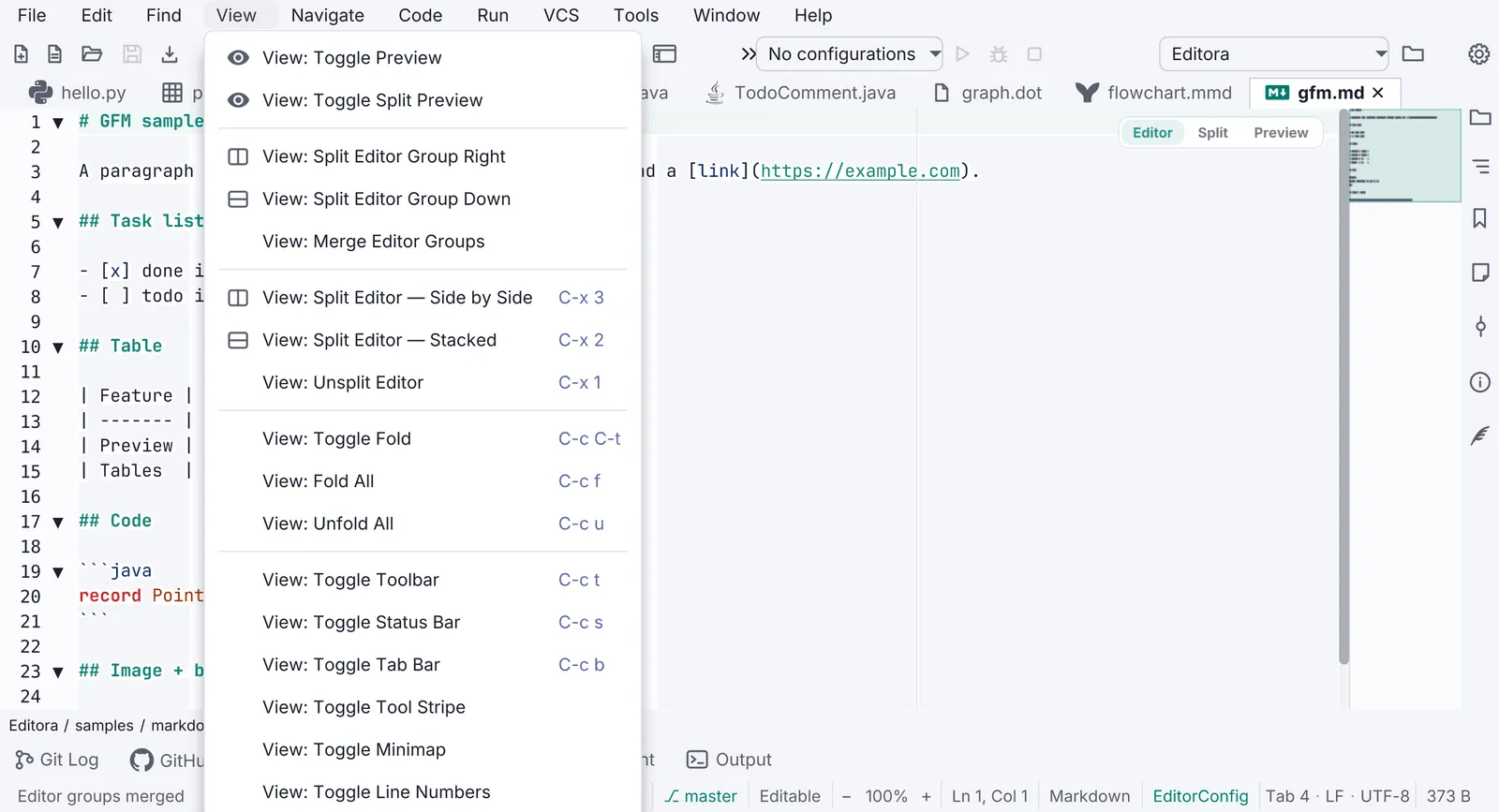
Two surfaces show the same rows: the menu bar, a browsable map of every command, and right-click menus, what
can be done with the thing under the pointer. Both are built from the command registry, so a row’s
title, icon, chord and enabled state come from the command and never drift from the palette or the toolbar.
Reference: Editora’s ui/MainMenuBar.java (menu bar), ui/ContextMenuDismissal.java, ui/LazyContextMenu.java,
ui/RowContextMenu.java and ui/TabContextMenu.java (right-click menus), and the .menu-item and .context-menu
rules in app.css.
Look and feel
Section titled “Look and feel”Both surfaces draw their rows the same way. Absolute pixels are deliberate: a popup inherits the font of the node it
was opened from, and em would resolve against a file tree’s or an 18 px toolbar’s size (Editora’s toolbar menu once
rendered a third larger than every other menu in the app).
| Property | Value | Reference |
|---|---|---|
| Font | Inter 14 px, regular, in every row and label | .context-menu, .context-menu .menu-item .label in app.css; MainMenuBar.UI_FONT_SIZE |
| Row | 34 px high: padding 8 × 12, the same in every theme | .menu-item { -fx-padding: 8px 12px } |
| Icon column | 22 px, reserved even when the row has no glyph, so a menu with a mix stays aligned; 8 px to the title | MainMenuBar.ICON_COLUMN, rowContent |
| Icon | The command’s glyph, the same one as on the toolbar and in the palette (Save is the same floppy everywhere), filled -color-fg-muted | Icons, MenuBarIcons, .toolbar-icon |
| Title | -color-fg-default | .menu-item-title |
| Chord | Right-aligned in its own column, 11 px, in the keyboard color (-state-key, brace periwinkle); at least 18 px from the title column | .menu-item-chord, alignChordColumns |
| Submenu row | Laid out like a command row, with an invisible chord as wide as the menu’s widest, so the arrow lands at the right edge | nestedMenu, .menu-submenu |
| Card | Radius 8; shadow rgba(27,30,42,0.28), radius 16, offset Y 16 | .context-menu |
| Danger item | Text in -color-danger-fg | .menu-item.danger |
| Disabled item | The theme’s dimmed label, and the icon dimmed with it | Termina’s .menu-item:disabled .menu-icon |
| Separators | Never two in a row and none at either end: when items hide, their orphaned separators hide too | LazyContextMenu.collapseSeparators, Torrenta’s MenuSeparators |
The shadow’s offset is not cosmetic. A menu is a native window sized to its root including the effect, so a shadow
that reaches above the menu is invisible window over the bar the menu hangs from, and the pointer lands on it instead
of the next menu button. The offset must be at least the radius; Editora pins it with MenuPopupBoundsFxTest.
The menu bar
Section titled “The menu bar”- 1Menu button. Padding 3 × 10 on a bar with 4 px side insets; the bar and the toolbar share one
-color-bg-subtleband with no rule under it. - 2Icon column, 22 px. A glyph only where an existing icon genuinely depicts the command; about half of Editora's rows have one. An invented glyph is worse than none, so the rest keep an empty column of the same width.
- 3Title, 14 px Inter, the command's title with the menu's own name dropped ("Save", not "File: Save") unless two rows would then read the same.
- 4Chord column. 11 px, periwinkle, right-aligned into one column per menu (not app-wide), read from the active keymap. Drawn by the app, not a JavaFX accelerator: Emacs chords are multi-key, which a
KeyCombinationcannot express, and on macOS an accelerator would bypass the key dispatcher. - 5Unbound command. An empty chord cell, never a wrong chord. A live keymap switch rewrites every cell.
- 6Submenu row. Icon, title and an invisible chord as wide as the menu's widest, so its arrow sits at the right edge instead of halfway across.
- 7Card. Radius 8; the shadow falls below the menu (offset ≥ radius), so nothing invisible covers the bar.
- MUST Every item is a command from the registry, with its title from
command.<id>, its chord from the active keymap and its enabled state from the command’s gate. The bar assembles and refreshes; it holds no behavior of its own (MenuBarModeloverCommandRegistry). - MUST No
KeyCombinationaccelerators. In the in-window bar each row is aCustomMenuItemlaying out icon, title, spacer and chord. On the macOS system menu bar (useSystemMenuBar) the native menu draws text only and no graphics, so there the chord is appended to the title and rows carry no icon, which is also the platform’s convention. - Enablement is re-read on every open (
refreshEnablement), titles and chords on a keymap or locale change. A menu built before Git finished detecting a repository must not stay grayed out. - Simple mode shows a shorter menu, rebuilt only when the mode actually changes.
Right-click menus
Section titled “Right-click menus”MUST on every list row, tree row, tab, editor and read-only console: the actions for that thing, each one a command. The mockup is an editor tab’s menu, shortened; Editora’s has twenty-five rows.
- 1Anchored at the pointer. The menu's top-left corner is the click. From the keyboard (Menu key or Shift+F10) it opens under the selected row, a quarter of the way in and never off a narrow one, or just below the caret in an editor; never in the middle of the control.
- 2Every row has an icon, the command's own. The one exception is a
CheckMenuItem, whose tick lives in the graphic column. - 3Grayed, not hidden. An action that does not apply right now (Save on an unchanged file, Reveal on an unsaved one) stays in place, dimmed. Only a row that cannot apply to this thing at all is hidden (the Git submenu on an untitled buffer).
- 4Separators group the rows; one that hiding has left alone hides too.
- 5Submenu for a family of actions (Git: stage, unstage, revert, compare, history), with its own icon.
- 6Labels follow state. Encrypt… becomes Lock File on an encrypted buffer, Pin Tab becomes Unpin Tab. Decided on every showing, not when the menu was built.
Behavior
Section titled “Behavior”- MUST. One menu at a time. A right-click while a menu is open replaces it; the first one closes before the
second shows. JavaFX stacks a second menu beside the first when each row owns its own
ContextMenu, and the stale one is then no longer dismissible. Editora’sContextMenuDismissalcloses every open right-click menu on the press that opens the next; Modula’sRadioPanehides the previous menu before showing a new one; Termina keeps one menu per view and shows it again. - MUST. A press anywhere outside the menu closes it, including inside the control the menu was opened on.
JavaFX’s auto-hide deliberately ignores a press on the menu’s owner node, so a stock menu on a tree or a
text area stays open when the user clicks another row or the text. The press is not consumed: a click in a
list still selects the row, and a right-click on another row opens that row’s menu straight away. Install the
fix once, at startup, for every current and future window (
ContextMenuDismissal.install()inApp); drop-downs opened by a plain click (menu buttons, choice boxes, the menu bar) keep the stock behavior, and a menu that turned auto-hide off is left alone. Pinned byContextMenuDismissalFxTest. - MUST. Escape closes it and focus goes back where it was. In a terminal the Escape must not reach the shell
(Termina’s
onKeyPressedfilter hides the menu and consumes the key). - MUST. Reachable from the keyboard. The Menu key and Shift+F10 arrive at the focused control, not at
a row’s cell, so a menu installed on cells never saw them.
RowContextMenu.install(tree)re-fires the request at the selected row’s cell, scrolled into view first, so every row action a mouse can reach the keyboard can too. - Right-click selects first. In an editor, a right-click outside every selection moves the caret to the click
(so Paste lands there); inside a selection it keeps carets and selections (so Cut and Copy act on what was
clicked). From the keyboard the target is the caret (
ContextMenuTarget). In a list, the menu is the clicked row’s. - Built when asked for. A menu attached to something that exists once per open file is built for every file
and opened for almost none, so
LazyContextMenu.of(build)builds the items on the first showing, and anonShowinghandler sets the labels, enablement and visibility for this showing, then collapses the separators. A read-only console’s menu is just Select All and Copy, both disabled while it is empty (ConsoleContextMenu). - Destructive rows carry the
dangerclass and follow the window shell rule: the action asks first with a button that names it, or is undoable. - Terminal views MAY. A program that grabbed the mouse owns the right-click; Shift+right-click always
opens the menu, and the keyboard request is never contested (Termina’s
shouldShowMenu, withContextMenuContentionTest).
| Property | Value | Reference |
|---|---|---|
| Kind | javafx.scene.control.ContextMenu, auto-hide on, hide on Escape on: a popup window, unlike the palette | TabContextMenu, ConsoleContextMenu |
| Opens at | The pointer; from the keyboard, the selected row’s bottom edge at min(width ÷ 4, 48) px in, or under the caret | RowContextMenu.anchorX, ContextMenuTarget |
| Font | Inter 14 px, pinned on .context-menu, whatever the owner’s font | app.css |
| Rows | 34 px (padding 8 × 12); icon column 22 px; glyph scaled 0.8 from a 24 dp Material path, or a 16-unit line glyph | Icons.ICON_SCALE, Icons.line |
| Card | Radius 8, shadow radius 16 at offset Y 16 | .context-menu |
| Dismissal | Any press outside the menu, in any window; the next right-click; Escape | ContextMenuDismissal, ContextMenuDismissalFxTest |
| Marker | A showing menu opened by a right-click or the Menu key carries the window property editora.rightClickMenu | ContextMenuDismissal.RIGHT_CLICK_MENU |
In the apps
Section titled “In the apps”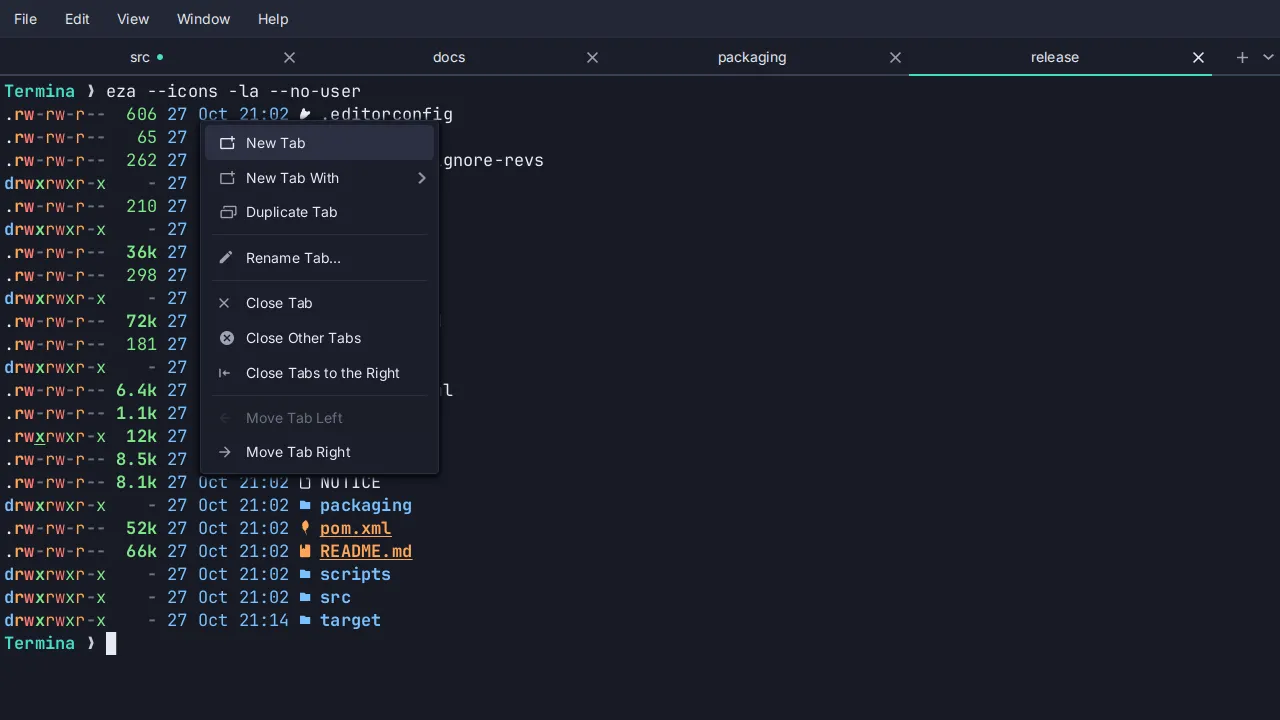
Pauta 1.3.1 · · Changelog