
Tabs and tool panels
A window shows its documents in a tab strip and its tools in panels docked beside or under them. Both are
driven by commands, both remember their state, and both draw their chrome as one band with the toolbar, not as boxes
inside boxes. Reference: Editora’s ui/TabHeaders.java (the tab header), ui/ClosedTabs.java, ui/Switcher.java,
ui/ToolWindowManager.java, ui/ToolWindowPanel.java and the .tab-pane, .tool-stripe and .tool-window
rules in app.css.
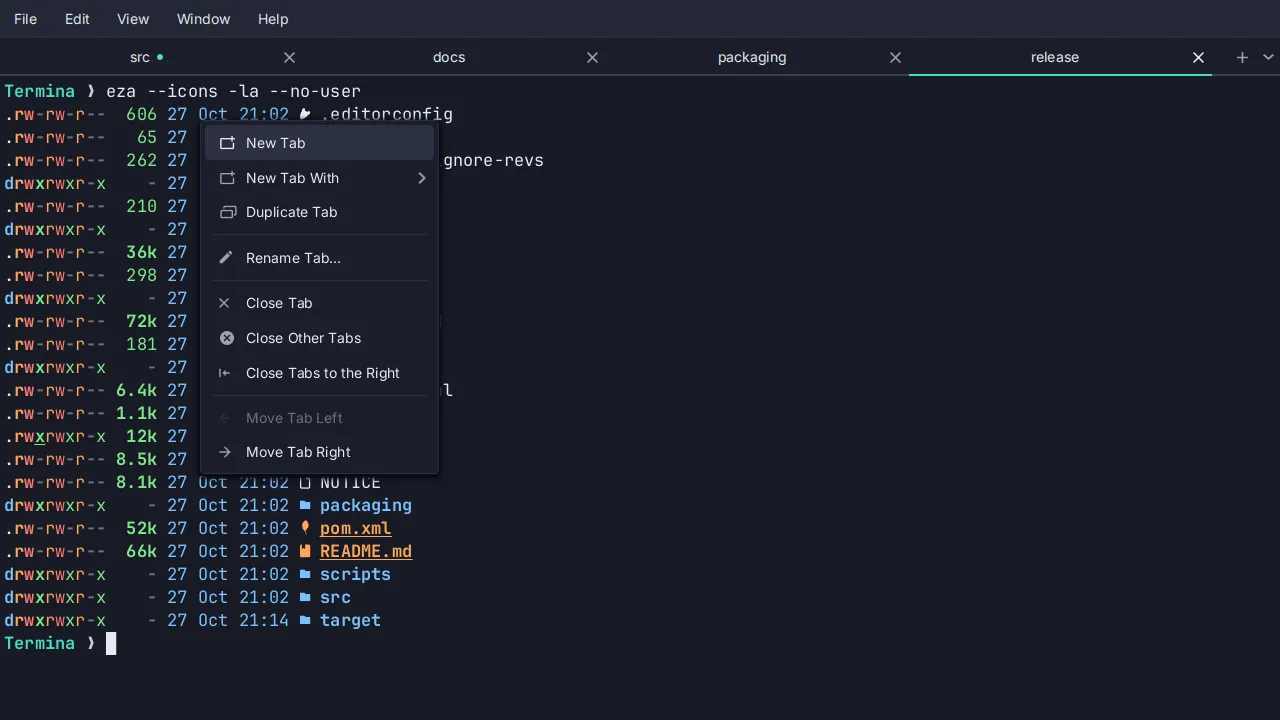
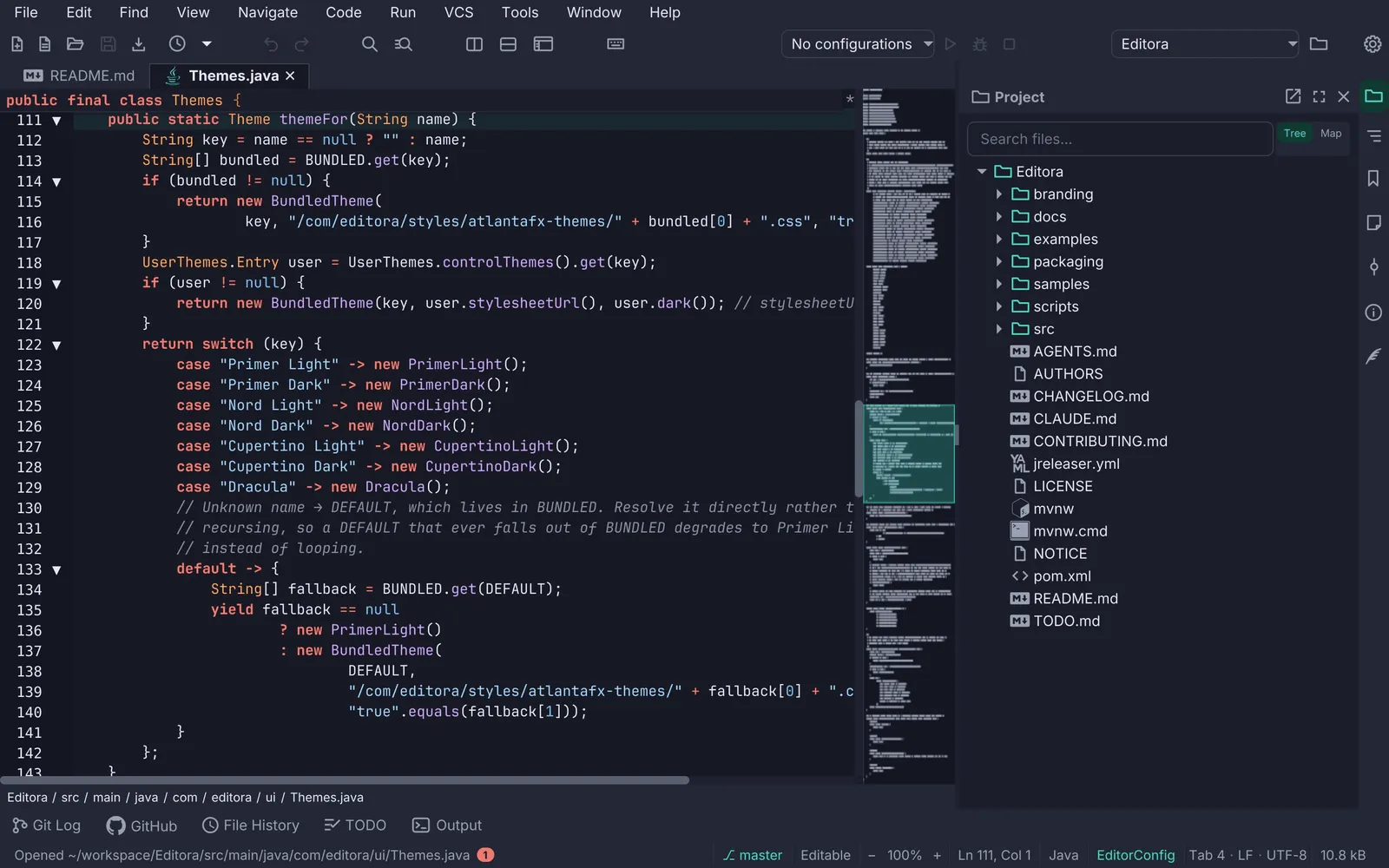
- 1Active tab. Its fill is the editor's own surface (
-editor-surface) with a border on three sides and none at the bottom, so the tab opens into the editor instead of sitting on it. Title bold in-color-fg-default; the file-type glyph tints accent. - 2Unsaved tab. A
•before the name, amber (-state-amber, "not durable yet") and italic. Amber outranks the Git-status color: "you have not saved this" matters more than "this differs from HEAD". - 3Pinned tab. A pin glyph and a bold title, kept at the front of the strip in pin order. Every bulk close (Others, All, Unmodified, Left, Right) skips it.
- 4Read-only tab. Muted and italic, echoing the status bar's Read-Only segment.
- 5Drag to reorder. The header is the drag handle and a snapshot of the whole tab follows the pointer; the dragged tab dims to 40 % and a 2 px accent line marks the edge it would land on (left half of a tab: before it; right half: after).
- 6Tool stripe. A 30 px rail of icon buttons, one per tool window, 8 px apart, on the subtle ground with no drawn edge. The open window's button is tinted; the one holding keyboard focus is tinted stronger. The first icon lines up with the editor's first line of text, not with the tab strip.
- 7Panel header. The window's glyph and title (14 px bold, muted) with float, maximize and close; the same size and glyph as its stripe button, so the two name the same thing. On the subtle ground, with no rule under it; when the panel holds focus the band tints accent-subtle and the title turns accent.
- 8The divider is the edge. The panel draws no frame: the SplitPane divider between it and the editor is the real, grabbable edge, and a hairline beside it would only double it. Its position is remembered.
- 9Bottom stripe. Its buttons carry a 14 px label beside the glyph, side by side; the open one is accent and bold.
- TABS-01 MUST Every tab operation is a command, so it can be bound to a chord, is in the palette and has a
menu row: close, close others, close all, close unmodified, close to the left and right, pin, reopen closed, next
and previous. The tab’s right-click menu lists the ones that act on a tab.
- Check (code): each operation has a registered command id, and
TabContextMenulists the per-tab ones. - Reference: Editora
ui/WindowCommandRegistrar.java(buffer.close,buffer.closeOthers,buffer.closeAll,buffer.closeUnmodified,buffer.closeLeft,buffer.closeRight,buffer.togglePin,buffer.reopenClosed,buffer.next),ui/TabContextMenu.java. Editora has no previous-tab command yet.
- Check (code): each operation has a registered command id, and
- TABS-02 MUST The header is the title: the Tab’s own text stays empty, and a graphic header carries the
file-type glyph, the markers and the title in a
.tab-titlelabel. The tooltip is the full path.- Why: the graphic is what makes the header a drag handle and lets each state set its own color.
- Check (code): every editor tab gets
setText("")and a graphic with a.tab-titlelabel; its tooltip is the file’s path. - Reference: Editora
ui/TabHeaders.java.
- TABS-03 MUST The one header carries the states: a
•prefix in amber italic for unsaved, a pin and bold for pinned, muted italic for read-only.- Check (code):
app.cssstyles.tab-header.dirty,.tab-header.pinnedand.tab-header.read-only.tab-title, and the header sets those classes. - Reference: Editora
ui/TabHeaders.java,app.css; the Unsaved, Pinned and Read-only rows of the Spec table below.
- Check (code):
- TABS-04 MUST Bulk close skips pinned tabs: close others, close all, close unmodified and close to the left
or right never close a pinned tab.
- Check (code):
closeOtherTabs,closeAllTabs,closeUnmodifiedTabsandeligibleToLeft/eligibleToRightall filter on the pinned set. - Reference: Editora
ui/MainController.java.
- Check (code):
- TABS-05 MUST Pinning moves the tab to the end of the pinned group, unpinning to just after it.
- Check (code):
togglePincallsmoveToPinBoundary. - Reference: Editora
ui/MainController.java(togglePin),ui/EditorArea.java(moveToPinBoundary).
- Check (code):
- TABS-06 MUST Reopen Closed Tab brings back the files whose tabs this window closed, newest first, bounded
to twenty, a file listed once, with the caret where it was. In a terminal app the tab comes back (its shells,
their directories, the pane arrangement, the names the user gave them, its place in the strip) and not the
scrollback.
- Why: the process is gone, and pretending otherwise would be worse than saying so.
- Check (test): a unit test over the closed-tab list holds the order, the bound, the single entry per file and the caret.
- Reference: Editora
ui/ClosedTabs.java,ClosedTabsTest;C-S-tin the CUA keymap. Terminaui/ClosedTabs.java, onCtrl+Shift+Z(Cmd+Zon macOS).
- TABS-07 SHOULD Tabs reorder by dragging, with the feedback shown above: the dragged header dimmed and an
accent line on the edge where it will land.
- Check (by hand): drag a tab along the strip and watch the landing edge.
- Reference: Editora
TabHeaders.enableTabDrag; TerminainstallTabDragand the pureTabReorder.insertIndex. In Termina a double-click on a tab renames it, and a pane dragged onto a tab joins it (the whole header outlined,tab-drop-into).
- TABS-08 SHOULD A tab shows its file’s Git status in the Project tree’s colors: modified accent, added
green, untracked olive, renamed violet, deleted muted, conflict red. A read-only tab still shows it; an unsaved one
shows amber.
- Check (test): a test gives a changed file the same style class the Project tree uses.
- Reference: Editora
ui/TabGitStatus.java,TabGitStatusTest.
- TABS-09 SHOULD A switcher lists the open files in tab order:
C-x C-b(Emacs) opens it,C-n/C-por the arrows move, Enter or releasing Ctrl activates,C-gor Esc cancels,C-dor Backspace closes the highlighted file. Its width is fixed to the longest path on each open, so it never resizes while you move.- Check (by hand): open it with several tabs and move through it; the list keeps its width.
- Reference: Editora
ui/Switcher.java,SwitcherFxTest.
- TABS-10 SHOULD The window title names the file, the project and the app, with a
●prefix for an unsaved file.- Check (code): the code that sets the stage title adds all three and the marker.
- Reference: Editora
MainController.updateWindowTitle.
- TABS-11 SHOULD Tabs sit in the title bar through JavaFX 27’s
HeaderBar; see Window shell.- Check (by hand): the tab strip shares the title bar’s row.
- Reference: Termina
ui/TerminalWindow.java.
- TABS-12 SHOULD A command hides the tab bar.
- Check (code): a registered command toggles the tab header.
- Reference: Editora
view.toggleTabBar,.tab-pane.no-tab-headerinapp.css.
Tool panels
Section titled “Tool panels”- TABS-13 MUST A command toggles each panel (
tool.<id>:M-1…M-0in the Emacs keymap for ten of them), and the stripe button is the same command with a glyph.- Check (code): every tool window registers a
tool.<id>command, and its stripe button runs it. - Reference: Editora
ui/ToolWindowManager.java,keymaps/emacs.json.
- Check (code): every tool window registers a
- TABS-14 MUST A panel’s content is built on first use.
- Check (test): an FX test holds that no closed tool window builds its panel before the first paint.
- Reference: Editora
LazyToolWindowsFxTest.
- TABS-15 SHOULD Panel state is restored: which windows are open, on which side, in what order, hidden or shown,
floating, and every divider position go to
workspace-state.jsonand come back on the next launch.- Check (code): the workspace state holds each of those, and the manager reads them back at startup.
- Reference: Editora
ui/ToolWindowManager.java,config/WorkspaceState.java.
- TABS-16 SHOULD Panels dock on three sides, left, right and bottom, and a side holds at most two windows
stacked (Project over Structure, two consoles along the bottom).
- Why: past that a side stops being a dock and becomes a list of slivers.
- Check (code): the sides are an enum of three and the per-side limit is two.
- Reference: Editora
ToolWindow.Side,ToolWindowManager.MAX_PER_SIDE.
- TABS-17 SHOULD A panel re-docks by dragging its stripe button to another stripe, with the same
dim-and-accent-line feedback as a tab; an empty stripe appears as a dashed accent drop zone for the duration of
the drag.
- Check (by hand): drag a stripe button to the opposite side.
- Reference: Editora
ui/ToolWindowDock.java,ToolWindowVisibilityTest(an empty stripe shows while dragging).
- TABS-18 SHOULD Panels float, maximize, resize and close from the keyboard, and at most one window is
maximized at a time.
- Check (code): the commands are registered and bound in the Emacs keymap.
- Reference: Editora
view.floatToolWindow,view.maximizeToolWindow(C-x f),view.closeFocusedToolWindow(C-x 0), the resize commands (C-x S-.,C-x S-,,C-x S-6).
- TABS-19 SHOULD Closing the panel that holds keyboard focus returns focus to where it was in the editor.
- Check (code): the manager keeps the last editor focus owner and refocuses it on close.
- Reference: Editora
ToolWindowManager.focusEditor, a weak reference to the last editor focus owner.
- TABS-20 SHOULD Hidden is not unavailable: the user’s show/hide choice for a stripe button is kept apart
from a context-driven hide (the Commit window outside a Git repository), so the second never clobbers the first.
- Check (test): a unit test holds that a button shows only when visible and available.
- Reference: Editora
ui/ToolWindowVisibility.java,ToolWindowVisibilityTest.
- TABS-21 SHOULD A bottom window that is unusable at the default height asks for more on its first open;
the user’s own size wins afterwards.
- Check (test): a test opens an output window taller while the others keep the side’s size.
- Reference: Editora
ToolWindow.setFirstOpenShare,ToolWindowFirstOpenShareTest.
- TABS-22 SHOULD A stripe button badges a spinner while its window has something under way.
- Check (test): an FX test badges a busy window’s stripe button without changing its size.
- Reference: Editora
ToolWindow.busy,ToolWindowManagerFxTest.
- TABS-23 SHOULD Panels follow the active document where they should: the Git UI follows the active tab’s
repository, the status bar’s environment segment the active
.httpfile, Local History the file whose tab menu opened it.- Check (by hand): switch between tabs from two repositories with the Git window open.
- Reference: Editora
ui/GitPathScope.java.
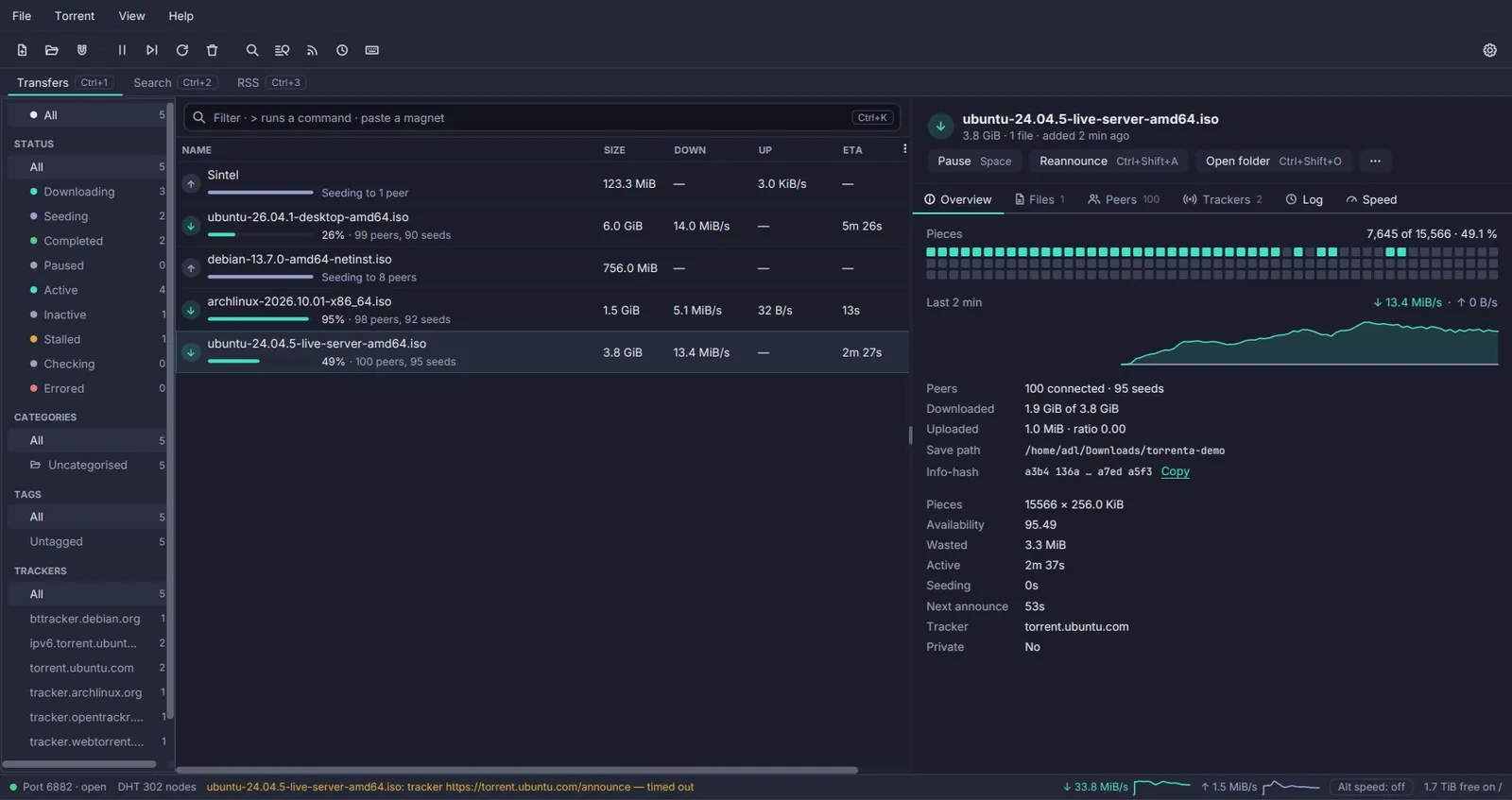
The other apps dock their panels the same way without a stripe. Torrenta’s filter sidebar sits down the left or
the right of the list or nowhere, kept as two settings keys so hiding it keeps its side (SidebarPlace); its inner
edge drags to resize within readable bounds and a double-click resets it (SidebarWidth); the detail pane docks
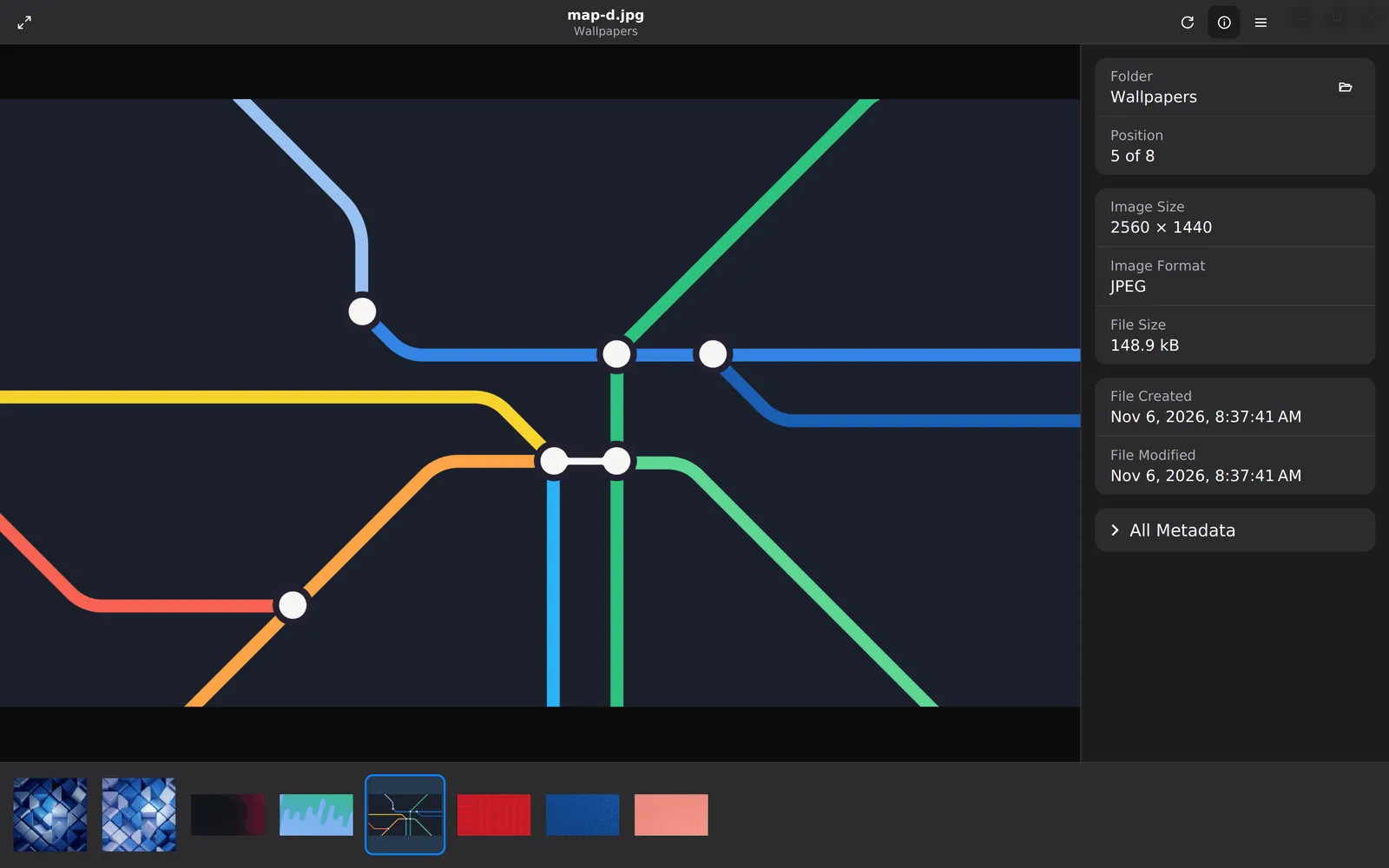
under the list in two columns or beside it in one, from the View menu (DetailPane). Mirada’s info panel opens on
the right and its thumbnail strip along the bottom or down the left side, each closed until its command asks for it
(ThumbnailStrip.place). Termina splits a tab into panes instead: a pane is picked up with a drag while
Ctrl+Alt+Shift (Cmd+Option+Shift on macOS) is held, since every smaller chord is spoken for (PaneDrag), and a
maximized pane wears a “Pane 2 of 3” badge so the others are known to still be there.
| Property | Value | Reference |
|---|---|---|
| Tab strip | -color-bg-subtle, padding 3 10 0 10, tabs bottom-aligned so the active one touches the editor; no bottom rule | .tab-pane > .tab-header-area |
| Tab | Transparent, square corners, padding 2 11 3 11; hover -color-bg-inset | .headers-region > .tab |
| Active tab | Two background layers: -color-border-default outside, -editor-surface inset 1 1 0 1; title bold -color-fg-default; glyph -color-accent-fg | .tab:selected |
| Title | Inter 14 px, -color-fg-muted, in a graphic label; the full path as tooltip | .tab .tab-title, TabHeaders.tooltip |
| Unsaved | • prefix, -state-amber, italic | .tab-header.dirty .tab-title |
| Pinned | Icons.pin() in the header, bold; first in the strip | .tab-header.pinned, togglePin |
| Read-only | -color-fg-muted, italic | .tab-header.read-only |
| Drag | Dragged header at 0.4 opacity; 2 px -color-accent-emphasis on the landing edge | .tab-dragging, .tab-drop-before, .tab-drop-after |
| Closed tabs | Twenty, newest first, one entry per file, with the caret | ClosedTabs.DEFAULT_CAPACITY |
| Switcher | 26 px rows, 12 visible, width fixed per open | Switcher.CELL_HEIGHT, MAX_VISIBLE |
| Tool stripe | 30 px wide, -color-bg-subtle, 8 px spacing, no edge; buttons min 24, padding 9 5, radius 6 | .tool-stripe, .tool-stripe-button |
| Stripe states | Open: -color-accent-subtle fill, accent glyph. Focused window: -state-accent-hover | :open, :tw-active |
| Bottom stripe | Label 14 px beside the glyph, padding 3 8; open = accent, bold | .tool-stripe-horizontal .tool-stripe-button |
| Panel | -color-bg-subtle ground, radius 0 0 8 8, no border | .tool-window |
| Panel header | Padding 6 6 6 12, radius 7 7 0 0, no rule under it; title 14 px bold muted with the window’s glyph; active: -color-accent-subtle band, accent title | .tool-window-header, .tool-window:active |
| Panel content | -color-bg-default, padding 8; its tree or list draws no frame of its own | .tool-window-content |
| Per side | Two windows at most, stacked in an inner SplitPane | MAX_PER_SIDE |
| Persisted | Open state, sides, order, visibility, floating windows, divider positions | WorkspaceState in workspace-state.json |
Pauta 4.1.0 · · Changelog · This page in the latest edition