
Keyboard first
Rules on this page 17
| ID | Level | Rule |
|---|---|---|
| Commands | ||
| KBD-01 | MUST | Every user-facing action is a Command (id, title, runnable) registered in one
CommandRegistry.
|
| KBD-02 | SHOULD | Command ids are dotted and grouped by area, as in file.open, view.toggleStatusBar
and help.reportProblem. A rule that names a command’s id requires that id; these three are examples.
|
| KBD-03 | MUST | A command’s title comes from command.<id> and its palette description from
command.<id>.desc in the message catalogs.
|
| KBD-04 | SHOULD | A command that cannot run in the current context is shown grayed, with a tooltip that says
why, not hidden.
|
| Command Palette | ||
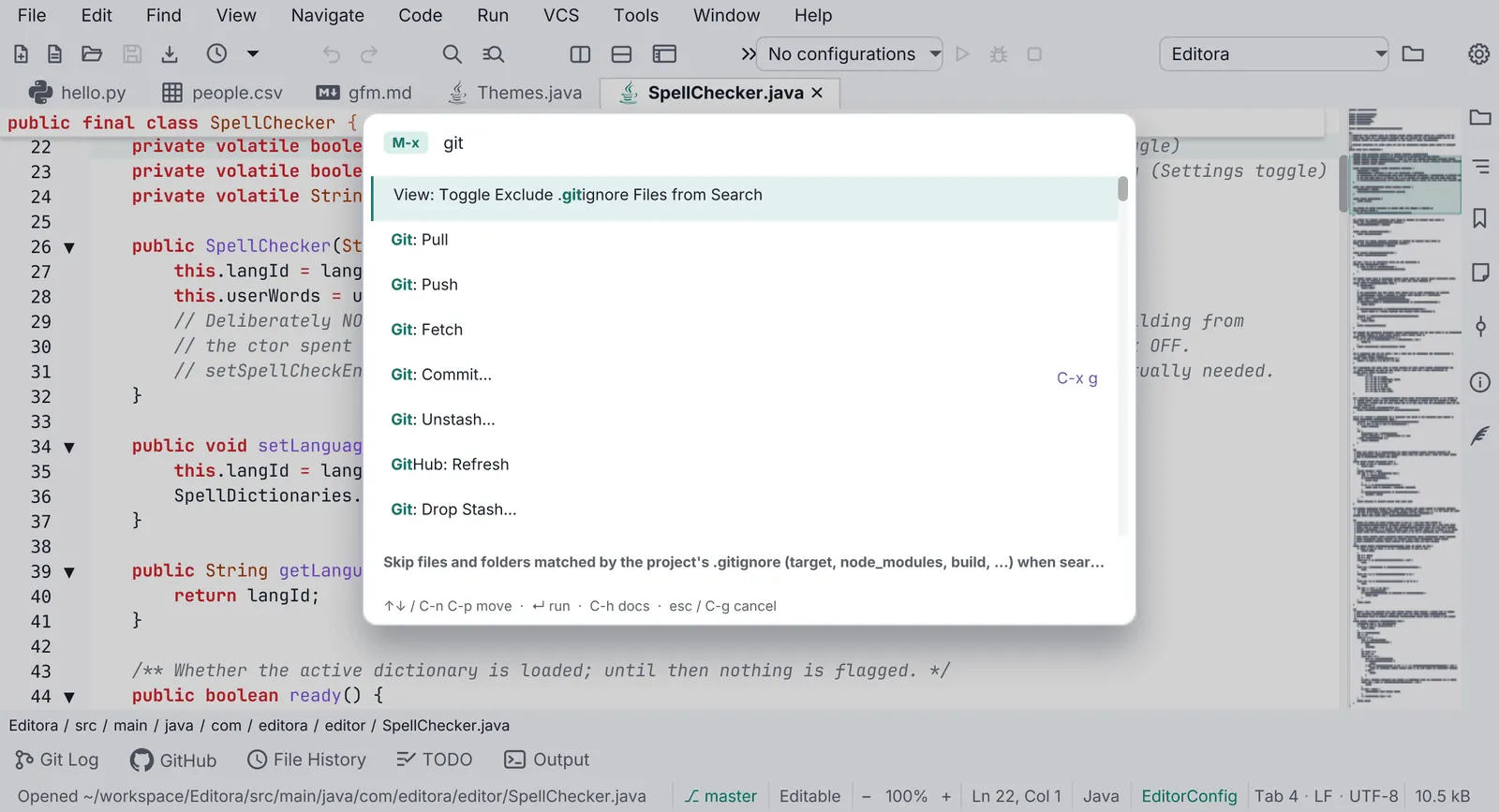
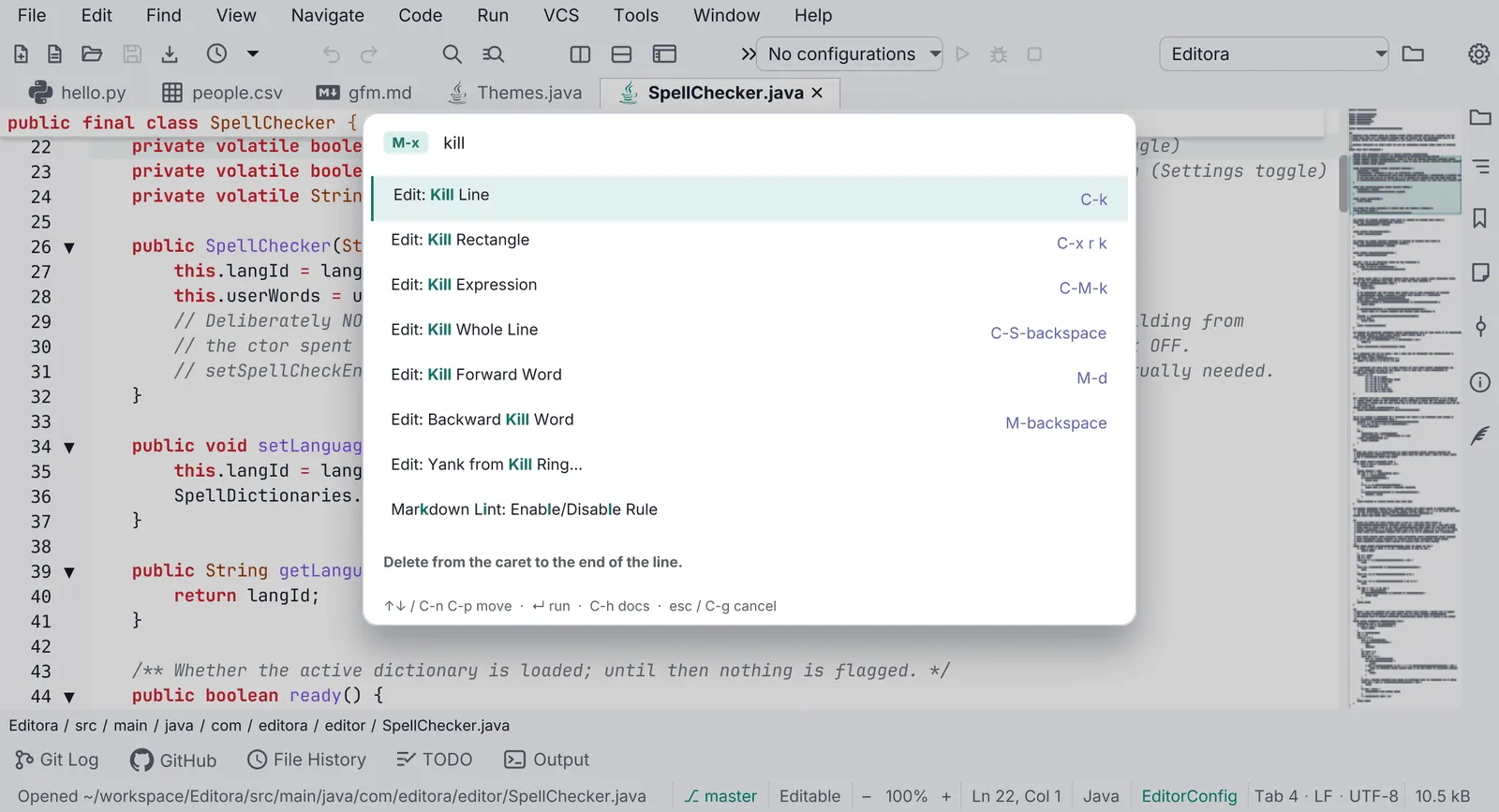
| KBD-05 | MUST | The Command Palette opens with M-x in the Emacs keymap and Ctrl+Shift+P (Cmd+Shift+P on
macOS) in the others; the IntelliJ keymap may use IntelliJ’s own Find Action chord, Ctrl+Shift+A
(Cmd+Shift+A), instead.
|
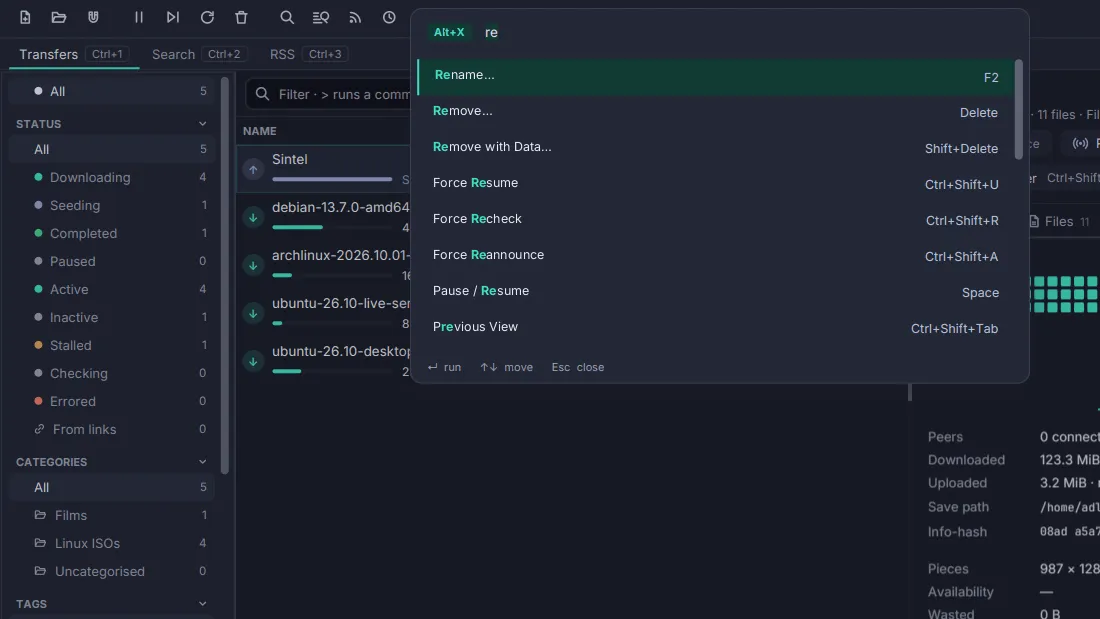
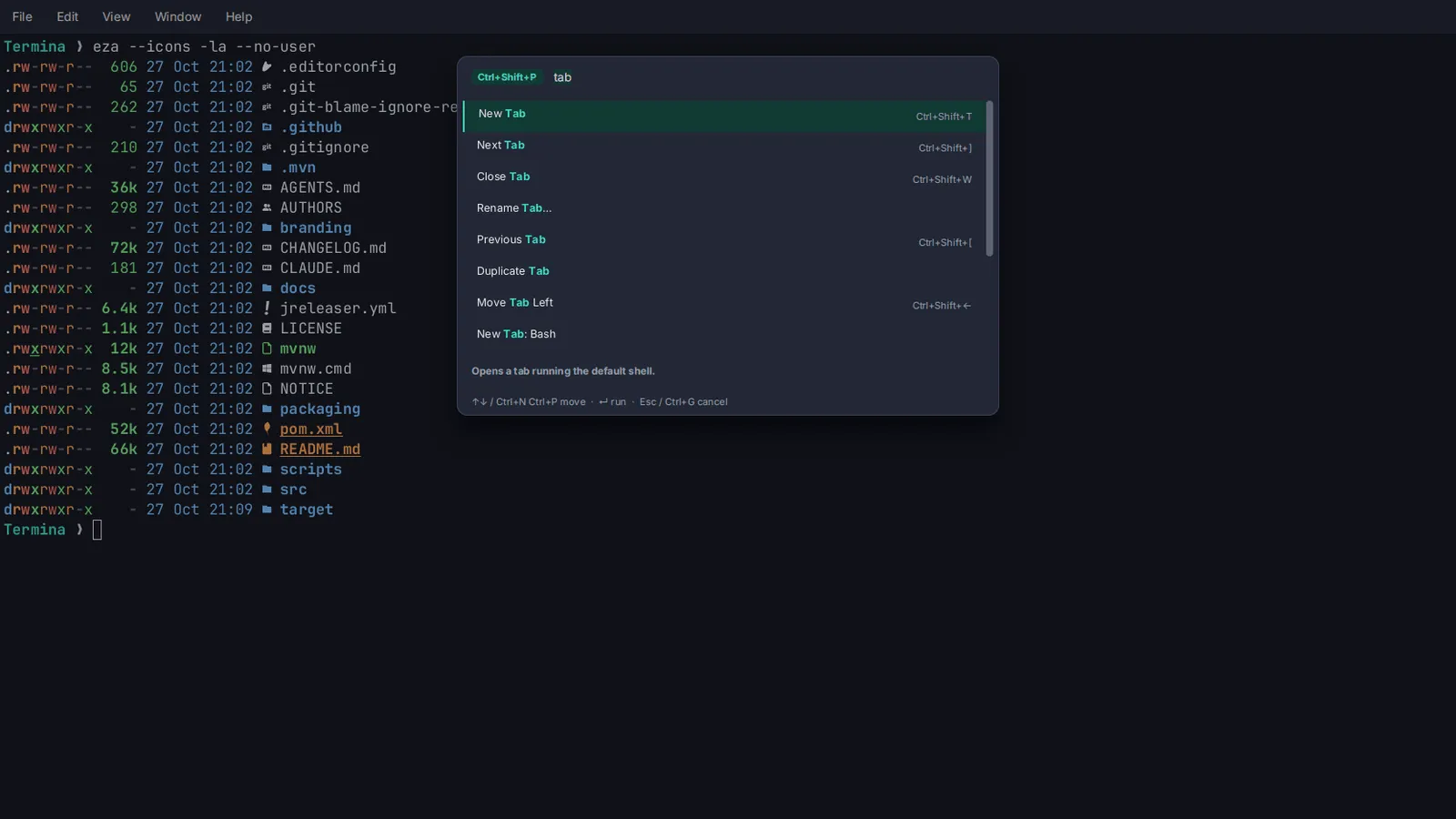
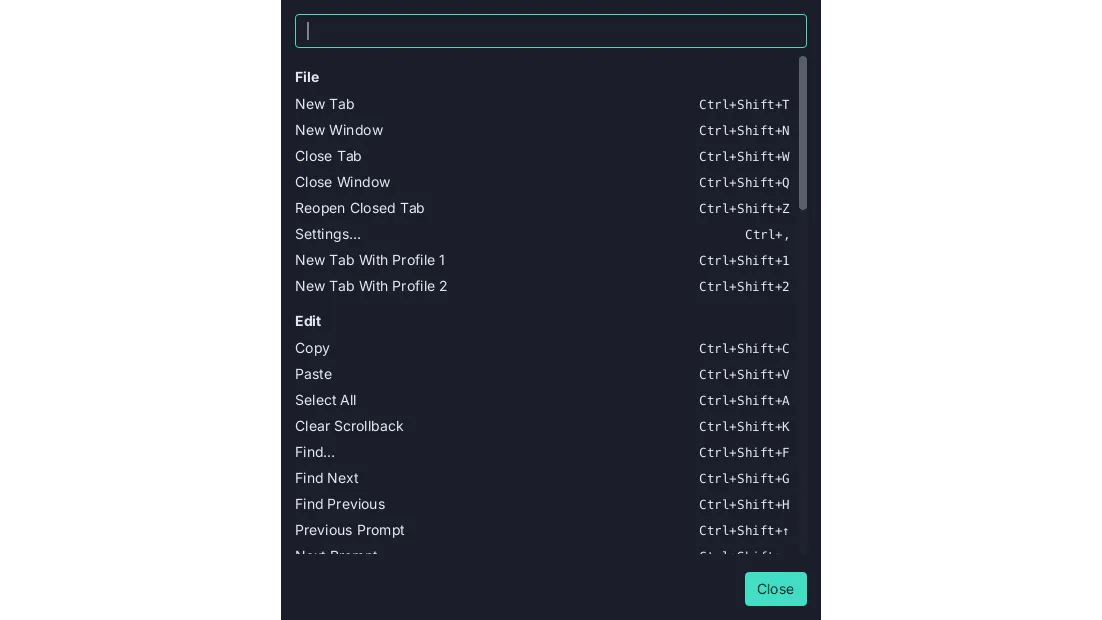
| KBD-06 | SHOULD | The palette matches fuzzily over title, id and description; a query that names a command’s
title outranks a fuzzy hit. Each row shows the command’s binding in the active keymap. See the
Command Palette template.
|
| KBD-07 | MUST | The palette is an in-scene overlay in the window’s root StackPane, not a
javafx.stage.Popup.
|
| Keymaps | ||
| KBD-09 | MUST | Except in a terminal, Emacs and CUA keymaps ship as JSON resources, CUA with a .mac.json
variant where Cmd replaces Ctrl. A terminal’s keys belong to the program it runs (C-a, M-x reach the shell), so
it ships one keymap of its own instead, keymap.json and keymap.mac.json, binding its commands to chords
programs don’t use.
|
| KBD-10 | SHOULD | IntelliJ, VS Code and Sublime keymaps ship the same way, each with its .mac.json variant.
|
| KBD-21 | MUST | A keymap’s .mac.json variant binds the same commands as the keymap it varies. A chord may
differ, to put Cmd where the other has Ctrl, to follow the macOS keymap of the editor it copies, or where
macOS keeps the chord for itself (Cmd+Space, Cmd+Tab). See Same on every OS.
|
| KBD-11 | MUST | Keymaps are applied in layers: base keymap → user overrides → plugin keymaps → the user’s own
bindings again. An app without plugins has the first two.
|
| KBD-12 | SHOULD | A keymap editor in Settings lists every command with its chord, is searchable, and warns of
conflicts.
|
| KBD-13 | SHOULD | No command’s chord is written into translated text. Every other label that shows a chord (a
hint, the palette, the status bar) shows the binding from the active keymap; tooltips are
TBAR-03 and menu rows MENU-15. Fixed keys of a control
(Enter, Tab, Esc, arrows) and keys meant for another program may be written.
|
| KBD-14 | SHOULD | A multi-key prefix ( C-x …) shows a which-key style hint listing the possible next keys.
|
| Focus and accessibility | ||
| KBD-15 | MUST | Every interactive control is reachable with Tab and operable with Space or Enter. A button whose
command the keyboard reaches another way is the exception: toolbar buttons
(TBAR-02) and the find bar’s buttons
(Find bar) stay out of the Tab order. See Accessibility.
|
| KBD-16 | MUST | Every control shows the focus ring when the keyboard focuses it. The ring is one layer of
:focus-visible rules in app.css, after every rule that sets a border or background on the same controls,
since rules of equal specificity are decided by order. Its color and contrast are ICON-12.
|
| KBD-18 | SHOULD | On/off rows use a keyboard-operable switch with the TOGGLE_BUTTON role.
|
Commands
Section titled “Commands”- KBD-01 MUST Every user-facing action is a
Command(id, title, runnable) registered in oneCommandRegistry.- Check (code): menu items, toolbar buttons, palette rows and key bindings run a command id through the registry; no control’s handler does work no command can reach.
- Reference: Editora
command/Command.java,command/CommandRegistry.java.
- KBD-02 SHOULD Command ids are dotted and grouped by area, as in
file.open,view.toggleStatusBarandhelp.reportProblem. A rule that names a command’s id requires that id; these three are examples.- Check (code): every registered id matches
<area>.<camelCaseName>. - Reference: Editora
ui/MenuBarModel.java.
- Check (code): every registered id matches
- KBD-03 MUST A command’s title comes from
command.<id>and its palette description fromcommand.<id>.descin the message catalogs.- Why: a registered command is then localized and discoverable without extra work.
- Check (test): a catalog parity test fails when a registered command has no
command.<id>orcommand.<id>.desckey. - Reference: Editora
i18n/messages.properties,MessagesTest.
- KBD-04 SHOULD A command that cannot run in the current context is shown grayed, with a tooltip that says
why, not hidden.
- Check (code): the palette and menus list a disabled command with a reason, rather than filtering it out.
- Reference: Editora
ui/Chrome.java(paletteEnabled,disabledReason).
Command Palette
Section titled “Command Palette”- KBD-05 MUST The Command Palette opens with
M-xin the Emacs keymap andCtrl+Shift+P(Cmd+Shift+Pon macOS) in the others; the IntelliJ keymap may use IntelliJ’s own Find Action chord,Ctrl+Shift+A(Cmd+Shift+A), instead.- Check (code): each bundled keymap binds that chord to the palette command.
- Reference: Editora
keymaps/emacs.json(M-x),cua.jsonandvscode.json(C-S-p),cua.mac.json(Cmd-S-p), all topalette.show;intellij.jsonbindsC-S-a.
- KBD-06 SHOULD The palette matches fuzzily over title, id and description; a query that names a command’s
title outranks a fuzzy hit. Each row shows the command’s binding in the active keymap. See the
Command Palette template.
- Check (test): a ranking test puts the title match first.
- Reference: Editora
ui/CommandPalette.java,search/FuzzyMatch.java.
- KBD-07 MUST The palette is an in-scene overlay in the window’s root
StackPane, not ajavafx.stage.Popup.- Why: on Windows a Popup does not reliably take OS keyboard focus, and the whole app can stop receiving keystrokes.
- Check (code): the palette and every picker add their node to the root
StackPane; none creates aPopup. - Reference: Editora
ui/CommandPalette.java.
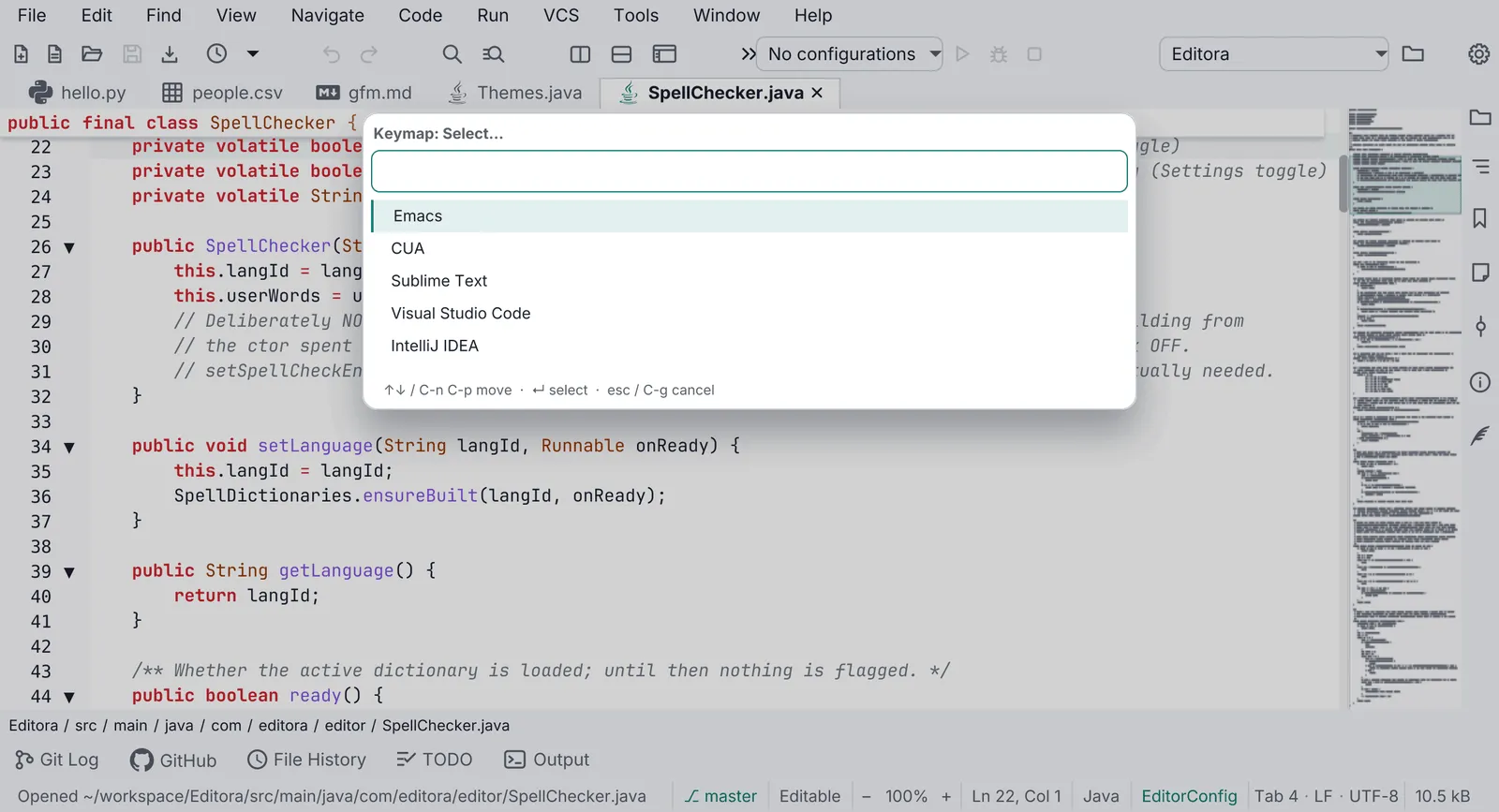
Every other list choice (recent files, themes, keymaps, a setting’s values) uses the same picker: QOPEN-01.
Keymaps
Section titled “Keymaps”- KBD-09 MUST Except in a terminal, Emacs and CUA keymaps ship as JSON resources, CUA with a
.mac.jsonvariant where Cmd replaces Ctrl. A terminal’s keys belong to the program it runs (C-a,M-xreach the shell), so it ships one keymap of its own instead,keymap.jsonandkeymap.mac.json, binding its commands to chords programs don’t use.- Why: an Emacs keymap in a terminal would take the shell’s own keys away from it.
- Check (code):
emacs.json,cua.jsonandcua.mac.jsonare in the app’s resources; in a terminal,keymap.jsonandkeymap.mac.jsonare. The command passes either set; judge which one the app should have. - Command:
[ -f pom.xml ] || { echo 'not an app root: no pom.xml here'; exit 1; }; has() { for f in "$@"; do find src/main/resources -name "$f" | grep -q . || return 1; done; }; has emacs.json cua.json cua.mac.json || has keymap.json keymap.mac.json || { echo 'missing emacs.json, cua.json and cua.mac.json (or, in a terminal, keymap.json and keymap.mac.json)'; false; } - Reference: Editora
src/main/resources/com/editora/keymaps/; Termina’skeymaps/.
- KBD-10 SHOULD IntelliJ, VS Code and Sublime keymaps ship the same way, each with its
.mac.jsonvariant.- Check (code):
intellij,vscodeandsublime.jsonand.mac.jsonfiles are in the resources. - Command:
[ -f pom.xml ] || { echo 'not an app root: no pom.xml here'; exit 1; }; ! for k in intellij vscode sublime; do for f in "$k.json" "$k.mac.json"; do find src/main/resources -name "$f" | grep -q . || echo "missing $f"; done; done | grep . - Reference: Editora
src/main/resources/com/editora/keymaps/.
- Check (code):
- KBD-21 MUST A keymap’s
.mac.jsonvariant binds the same commands as the keymap it varies. A chord may differ, to putCmdwhere the other hasCtrl, to follow the macOS keymap of the editor it copies, or where macOS keeps the chord for itself (Cmd+Space,Cmd+Tab). See Same on every OS.- Why: a command with no chord on one OS is a command that user never finds from the keyboard.
- Check (test): a test loads each keymap and its
.mac.jsonvariant and compares the commands they bind. - Reference: Editora
KeymapsTest(guiKeymapsBindSameCommandSetOnBothPlatforms).
- KBD-11 MUST Keymaps are applied in layers: base keymap → user overrides → plugin keymaps → the user’s own
bindings again. An app without plugins has the first two.
- Why: the user always has the last word, and a plugin can still use a chord the user freed.
- Check (code): one place applies the layers in that order.
- Reference: Editora
ui/KeymapLayers.java.
- KBD-12 SHOULD A keymap editor in Settings lists every command with its chord, is searchable, and warns of
conflicts.
- Check (by hand): open Settings → Keymap, search, and bind a chord that is taken.
- Reference: Editora
ui/SettingsKeymapsPage.java; conflicts fromKeybindingEdits.conflicts, and the defaults a chord would take fromEditorSettingsCoordinator.takenDefaults.
- KBD-13 SHOULD No command’s chord is written into translated text. Every other label that shows a chord (a
hint, the palette, the status bar) shows the binding from the active keymap; tooltips are
TBAR-03 and menu rows MENU-15. Fixed keys of a control
(Enter, Tab, Esc, arrows) and keys meant for another program may be written.
- Check (code): no message catalog value names a command’s chord (
Ctrl+,Cmd+,C-x,M-x); chords are rendered by one formatter. - Reference: Editora
command/ChordFormat.java, the one place a binding is rendered. Editora’scommand.edit.universalArgumenttitle still carriesC-u.
- Check (code): no message catalog value names a command’s chord (
- KBD-14 SHOULD A multi-key prefix (
C-x …) shows a which-key style hint listing the possible next keys.- Check (by hand): press
C-xin the Emacs keymap and wait. - Reference: no app lists the next keys yet. Editora echoes only the pending prefix (
C-x -) in the status bar (command/KeyDispatcher.java).
- Check (by hand): press
Focus and accessibility
Section titled “Focus and accessibility”- KBD-15 MUST Every interactive control is reachable with Tab and operable with Space or Enter. A button whose
command the keyboard reaches another way is the exception: toolbar buttons
(TBAR-02) and the find bar’s buttons
(Find bar) stay out of the Tab order. See Accessibility.
- Why: a control that Tab can’t reach is one a keyboard-only or screen-reader user can’t use at all.
- Check (by hand): Tab through every window and dialog without the mouse.
- Reference: Editora;
FocusRingFxTestholds that every control family draws the focus ring when Tab reaches it.
- KBD-16 MUST Every control shows the focus ring when the keyboard focuses it. The ring is one layer of
:focus-visiblerules inapp.css, after every rule that sets a border or background on the same controls, since rules of equal specificity are decided by order. Its color and contrast are ICON-12.- Why: a keyboard user who can’t see where focus is can’t use the window; the ring’s color is a MUST, and so is drawing it.
- Check (test): an FX test tabs to each control family and asserts the ring.
- Reference: Editora
app.css(Keyboard focus, one layer for every control),FocusRingFxTest.
- KBD-18 SHOULD On/off rows use a keyboard-operable switch with the
TOGGLE_BUTTONrole.- Why: a bare AtlantaFX
ToggleSwitchis mouse-only. - Check (code): no
new ToggleSwitchoutside the switch class. - Reference: Editora
ui/SettingSwitch.java.
- Why: a bare AtlantaFX
Related rules on other pages: every icon-only button gets its name from one helper, TBAR-01; rows wrap instead of being cut short in every language, INTL-04; readable text and its contrast are one rule, ICON-09.
Pauta 5.0.0 · · Changelog · This page in the latest edition