
Command Palette
One palette per main window lists every registered command, so a command that exists is a command people can find. The
pure parts (FuzzyMatch, MatchText, the key helper, PickerKeys in Editora and PaletteKeys in the copies, and the
caret-key helper, TextInputKeymap in Editora and TextInputKeys in the copies) are shared with Termina and Mirada.
Torrenta shares MatchText and ranks with its own CommandMatcher.
Rules on this page 9
| ID | Level | Rule |
|---|---|---|
| Rules | ||
| PAL-01 | MUST | Every app has a Command Palette, one in each main window, opened by the palette.show command.
A Settings, About or log window needs none of its own. Its chords, M-x in the Emacs keymap and Ctrl+Shift+P
(Cmd+Shift+P on macOS) in the others (Ctrl+Shift+A allowed in the IntelliJ keymap), are
KBD-05. |
| PAL-02 | MUST | The palette lists every registered command, with its title and description
(KBD-03). |
| PAL-10 | SHOULD | The palette is 620 px wide, its rows 36 px high with 8 visible before the list scrolls, at
the default zoom (WIN-12), and its field’s prompt reads “Run command…”, in words
from the catalog (Editora’s key for them is palette.prompt). |
| Behavior | ||
| PAL-04 | SHOULD | Every open starts with an empty query: the palette does not keep the last one, so it opens
on the whole list (PAL-02).
|
| PAL-05 | SHOULD | Typing in the palette filters its list, and the first enabled match is selected.
|
| PAL-06 | SHOULD | The active keymap’s line and page chords move the selection, as do ↑ ↓ and Page Up/Down,
which always work. In Editora they are the chords of its nav.lineDown, nav.lineUp, nav.pageDown and
nav.pageUp commands, C-n and C-p among them in the Emacs keymap. Enter, or a click on an enabled row, runs
the command. The palette closes first, then the command runs.
|
| PAL-07 | SHOULD | The active keymap’s cancel chord, Esc or a click on the scrim cancels the palette, and focus
returns to where it was. In Editora the chord is that of its edit.cancel command, C-g in the Emacs keymap.
|
| PAL-08 | SHOULD | In the palette, a help chord opens the selected command’s page in the docs on the website,
for the running version. The chord is the first of Ctrl+H, F1 and Shift+F1 that the active keymap leaves
free. It is the same on macOS, where Ctrl+H is the Control key and has no Cmd form (C-h in Emacs notation).
|
| PAL-09 | SHOULD | A live keymap switch re-renders the palette’s key chips, its opener chip and its key legend.
|
-
PAL-01 MUST Every app has a Command Palette, one in each main window, opened by the
palette.showcommand. A Settings, About or log window needs none of its own. Its chords,M-xin the Emacs keymap andCtrl+Shift+P(Cmd+Shift+Pon macOS) in the others (Ctrl+Shift+Aallowed in the IntelliJ keymap), are KBD-05.- Check (code): each main window builds one palette, and the command registered as
palette.showopens it (in Editora the window controller builds oneCommandPalette). A window that is not a main window (Settings, About, a log, a history or events window) is not judged. - Reference: Editora
ui/CommandPalette.java, built once inMainController.
- Check (code): each main window builds one palette, and the command registered as
-
PAL-02 MUST The palette lists every registered command, with its title and description (KBD-03).
- Check (code): the palette’s rows come from the whole registry, filtered only by the query; a command that cannot run stays listed, grayed; each row shows its command’s title; and the palette shows the description of the command under the cursor, in the row or in a line of the card. A palette that shows no description fails this rule; that every command has one is KBD-03’s.
- Reference: Editora
CommandPalette.filter(registry.all()),MessagesTest; the page’s Spec. Torrenta’s, Modula’s and nux’s palettes don’t yet. Torrenta’s lists only the commands that can run now:showinui/CommandPalette.javadrops every disabled command, afterofferedCommandsinui/MainWindow.javahas dropped what the engine cannot run and what Simple mode hides; and it shows no description, since itsCommandhas none. Modula’s leaves out one (stereo, while its control is disabled, inui/RadioPane.java), and its rows show a title and a shortcut, with no description (ui/CommandPalette.java). nux’s lists its whole registry, and each row shows the title and the command’s id, with no description: its commands have none (ui/CommandPalette.java,CommandCell;command/CommandRegistry.java).
-
PAL-10 SHOULD The palette is 620 px wide, its rows 36 px high with 8 visible before the list scrolls, at the default zoom (WIN-12), and its field’s prompt reads “Run command…”, in words from the catalog (Editora’s key for them is
palette.prompt).- Why: the palette is the one window every app shares; a different width or prompt is the first thing a person moving between apps notices.
- Check (code): the palette’s width, row height and visible rows come from constants of these values, and its prompt is read from the catalog, where the English is “Run command…”. The rule asks for the words, not for a catalog key.
- Reference: Editora
ui/CommandPalette.java(ROW_HEIGHT,VISIBLE_ROWS), Torrenta, Termina and the app template’sui/Picker.java. Mirada’sui/CommandPalette.javamatches the three sizes and reads the same words from the catalog under another key,palette.runCommandPrompt. Modula’s is 420 px with a literal “Type a command…”, and nux’s 540 px with apalette.promptthat reads “Type a command…”.
The palette is an in-scene overlay in the window’s root StackPane, over a faint scrim, never a
javafx.stage.Popup: KBD-07.
Anatomy
Section titled “Anatomy”- 1Opener chip. The chord that opened the palette, read from the active keymap. No chip when the user has unbound it, never a wrong one.
- 2Query field. The first row is the input; there is no title. Prompt "Run command…". Emacs caret keys work inside it.
- 3Match highlight. The characters the fuzzy matcher scored, bold in the accent color. The highlight and the ranking come from the same call, so they never disagree.
- 4Selected row. Tinted background plus a 2 px accent bar on its inside edge. The bar is what makes the selection readable in a long list.
- 5Key chip. The command's binding in the active keymap, in the keyboard color (brace periwinkle). Absent when unbound.
- 6Unavailable command. Listed, grayed, never selected and inert to clicks. Its tooltip says why and what to do ("Unavailable — no merge, rebase, cherry-pick or revert is in progress.").
- 7Description. The selected command's
command.<id>.desc, one line with an ellipsis, always one line tall so the card never jumps. - 8Key legend. The palette's own keys, rendered from the active keymap. The mockup shows the Emacs keymap's:
C-n,C-pandC-gare its line and cancel chords (PAL-06, PAL-07).
| Property | Value | Reference |
|---|---|---|
| Kind | In-scene overlay in the window’s root StackPane, over a faint scrim. Not a javafx.stage.Popup: on Windows a popup does not reliably take keyboard focus. | OverlayHost |
| Width | 620 px (PAL-10) | content.setPrefWidth(620) |
| Rows | 36 px high, 8 visible before the list scrolls (PAL-10) | ROW_HEIGHT, VISIBLE_ROWS |
| Card | -color-bg-overlay, 1 px -color-border-default, radius 12, padding 6, one wide drop shadow | .command-palette in app.css |
| Row text | 12.5 px; padding 7 × 16 | .command-palette .list-cell |
| Scrim | rgba(0,0,0,0.18), the value of a token defined on .root (ICON-08); a click on it closes the palette | .overlay-backdrop |
| Content | Every registered command: title from command.<id>, description from command.<id>.desc | CommandRegistry, MessagesTest |
| Ranking | Editora scores the title; when the title does not match, the id’s namespace word (markdown for markdown.tableAddRow, “Table: Add Row”), then the names other IDEs give the command. The description is shown, not matched. A query that names a title outranks a fuzzy hit. The app template scores the title and the words of the id, and shows the description | FuzzyMatch, Command.keywords, OtherIdeNames, titlePhraseScore; the template’s ui/Picker.java |
Behavior
Section titled “Behavior”- PAL-04 SHOULD Every open starts with an empty query: the palette does not keep the last one, so it opens
on the whole list (PAL-02).
- Check (code):
showclears the field and filters on the empty query before the card appears. - Reference: Editora
CommandPalette.show.
- Check (code):
- PAL-05 SHOULD Typing in the palette filters its list, and the first enabled match is selected.
- Check (code): after each filter the palette selects the first row whose command can run, stepping over
disabled rows at the top (Editora’s
selectFirstEnabled). A test that asserts it, with a disabled command at the top, is the surest evidence. - Reference: Editora
CommandPalette.selectFirstEnabled,CommandPaletteDisabledFxTest.
- Check (code): after each filter the palette selects the first row whose command can run, stepping over
disabled rows at the top (Editora’s
- PAL-06 SHOULD The active keymap’s line and page chords move the selection, as do ↑ ↓ and Page Up/Down,
which always work. In Editora they are the chords of its
nav.lineDown,nav.lineUp,nav.pageDownandnav.pageUpcommands,C-nandC-pamong them in the Emacs keymap. Enter, or a click on an enabled row, runs the command. The palette closes first, then the command runs.- Check (code): the palette’s key handler looks a press up in the active keymap and moves on the commands it binds for a line and a page up and down, not on fixed letters, and on ↑ ↓ and Page Up/Down whatever the keymap; the run path hides the card before it calls the registry, and does nothing on a disabled row.
- Reference: Editora
CommandPalette.runSelected,PickerKeys.resolve, and the app template’sui/PickerKeys.java(resolve, for itsui/Picker.java), which reads the keymap’snav.lineDown,nav.lineUp,nav.pageDownandnav.pageUpbeside the fixed keys: the two palettes that ask the keymap. The others move on fixed keys: Termina’sui/PaletteKeys.javaand Mirada’sui/PaletteKeys.javaon a fixed table of Emacs chords beside them (EMACS:C-n,C-p,C-v,M-v); Torrenta’sui/CommandPalette.java(onKey) on the arrows andCtrl+NandCtrl+P, with no page keys; Modula’sui/CommandPalette.javaand nux’sui/CommandPalette.javaon the arrows alone.
- PAL-07 SHOULD The active keymap’s cancel chord, Esc or a click on the scrim cancels the palette, and focus
returns to where it was. In Editora the chord is that of its
edit.cancelcommand,C-gin the Emacs keymap.- Check (code): Esc, the chord the active keymap binds to the cancel command, and a press on the backdrop all hide the overlay, and hiding focuses the node that had focus before it opened. In an app with one key table (a terminal app’s keymap, or the built-in table of an app that ships no keymap files), the chord is the one that table binds to a cancel command; where it binds none, Esc and the backdrop are all there is to test.
- Reference: Editora
PickerKeys(isCancel),OverlayHost(previousFocus), and the app template’sui/OverlayHost.java(cancelOn, whichui/MainWindow.javahands the keymap’sedit.cancelchord,C-gin its Emacs keymap, andhide, which gives the focus back): the two that ask the keymap for the chord.Ctrl+Gis fixed in theEMACStable of Termina’sui/PaletteKeys.javaand Mirada’sui/PaletteKeys.java. Torrenta’s, Modula’s and nux’s palettes cancel on Esc and on a press on the backdrop: none of the three apps has a keymap or a cancel command, so the chord asks nothing more of them.
- PAL-08 SHOULD In the palette, a help chord opens the selected command’s page in the docs on the website,
for the running version. The chord is the first of
Ctrl+H,F1andShift+F1that the active keymap leaves free. It is the same on macOS, whereCtrl+His the Control key and has noCmdform (C-hin Emacs notation).- Check (code): the palette’s help chord is the first of the three that the active keymap neither binds nor starts a longer chord with, and the URL it opens is built from the app’s versioned docs address and the selected command’s id.
- Reference: Editora
CommandPalette(PickerKeys.freeChordoverC-h,f1andS-f1;docsUrl),AppInfo.docsUrl. The app template’sui/PickerKeys.java(HELP_CHORDS,helpChord) picks the chord the same way, and the palette opens the command’s page under its versioned docs (PickerFxTest,helpTitleCurrentValueAndTheEnds). No other app’s palette has a help chord yet.
- PAL-09 SHOULD A live keymap switch re-renders the palette’s key chips, its opener chip and its key legend.
- Check (code): applying a new keymap calls the palette’s rebind method, which rebuilds the opener, the legend and the rows.
- Reference: Editora
CommandPalette.refreshBindings, called fromSettingsReapply; the app template’sPicker.rebind(ui/Picker.java), which its palette runs on a keymap change with the new opener, rows and legend (ui/MainWindow.java).
| Key | English |
|---|---|
palette.prompt | Run command… |
palette.disabled.<reason> | Unavailable — what is missing. What to do first. |
In the apps
Section titled “In the apps”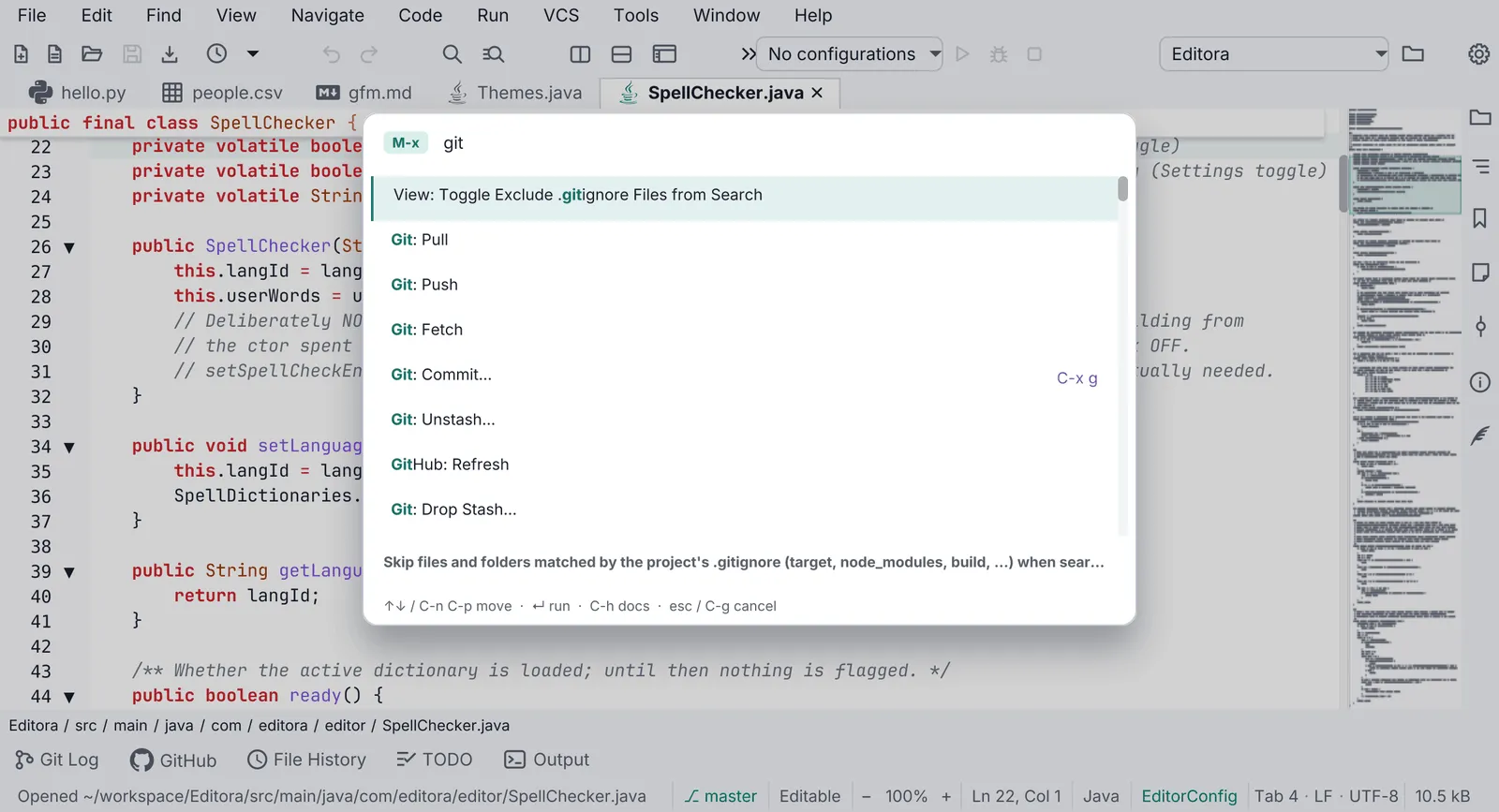
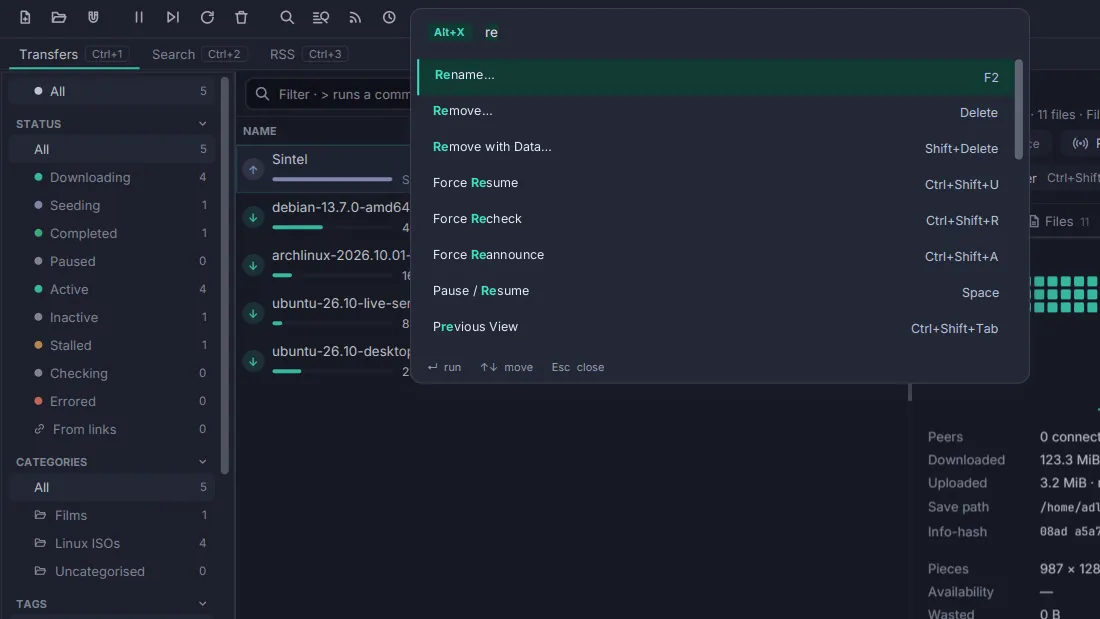
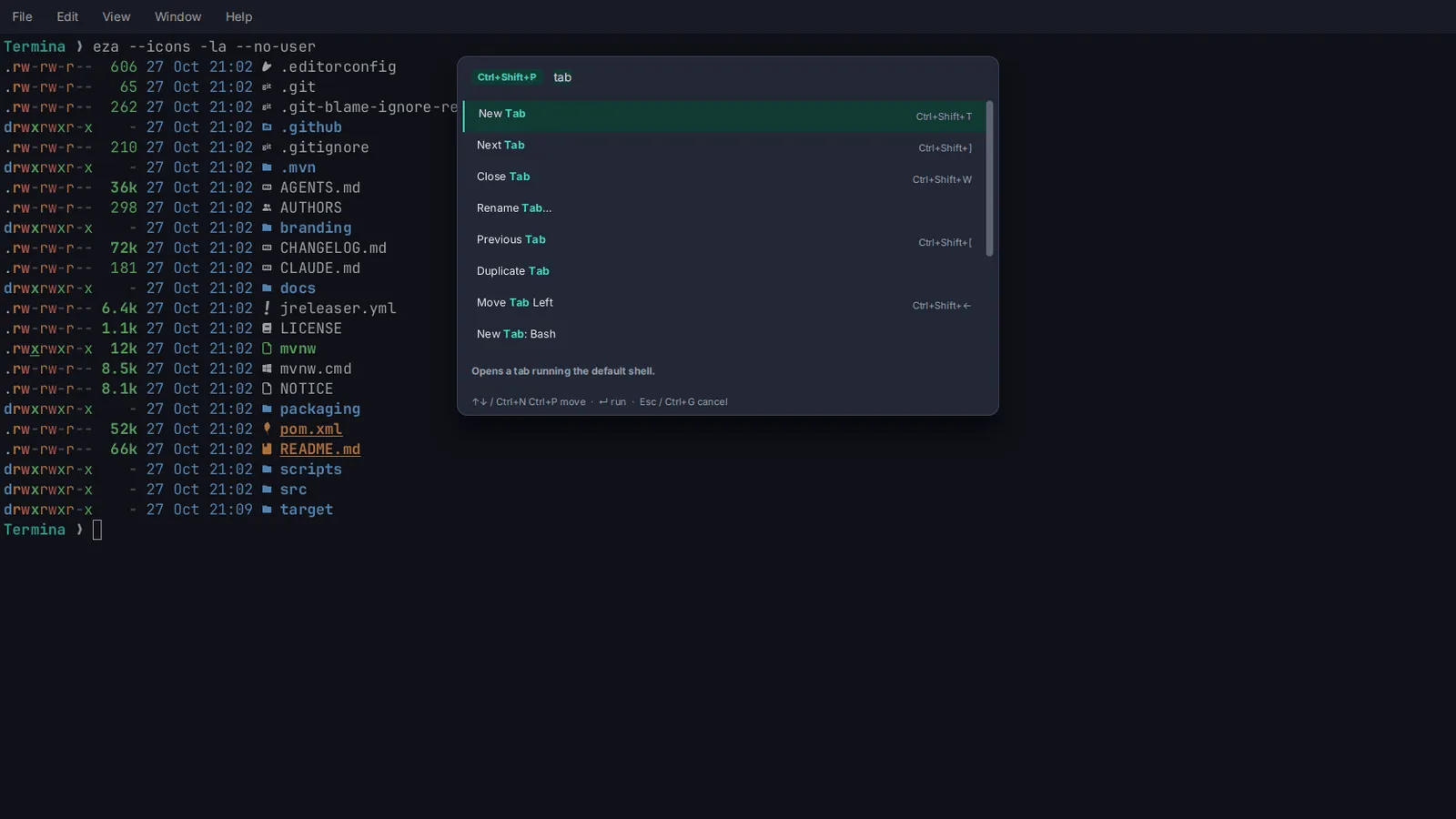
Pauta 6.1.0 · · Changelog · This page in the latest edition