
Keyboard first
Every app can be used from the keyboard alone (principle 2), and that rests on one idea: every action is a command with an id (principle 3). Menus, toolbar buttons, the Command Palette and key bindings all run commands, so whatever the mouse can do, the palette or a chord can do too. Keymaps bind chords to those commands in layers, with the user’s own bindings on top, and every control the keyboard reaches shows where the focus is. The palette’s own shape is the Command Palette template; what a screen reader and the OS’s accessibility settings need is Accessibility.
Rules on this page 18
| ID | Level | Rule |
|---|---|---|
| Commands | ||
| KBD-01 | MUST | Every user-facing action is a command (an id, a title and a runnable) registered in one
command registry (Editora’s Command and CommandRegistry).
|
| KBD-02 | SHOULD | Command ids are dotted and grouped by area, as in file.open, view.toggleStatusBar
and help.reportProblem. A rule that names a command’s id requires that id; these three are examples.
|
| KBD-03 | MUST | A command’s title comes from command.<id> and its one-line palette description from
command.<id>.desc in the message catalogs.
|
| KBD-04 | SHOULD | A command that cannot run in the current context is shown grayed, with a tooltip that says
why, not hidden.
|
| Command Palette | ||
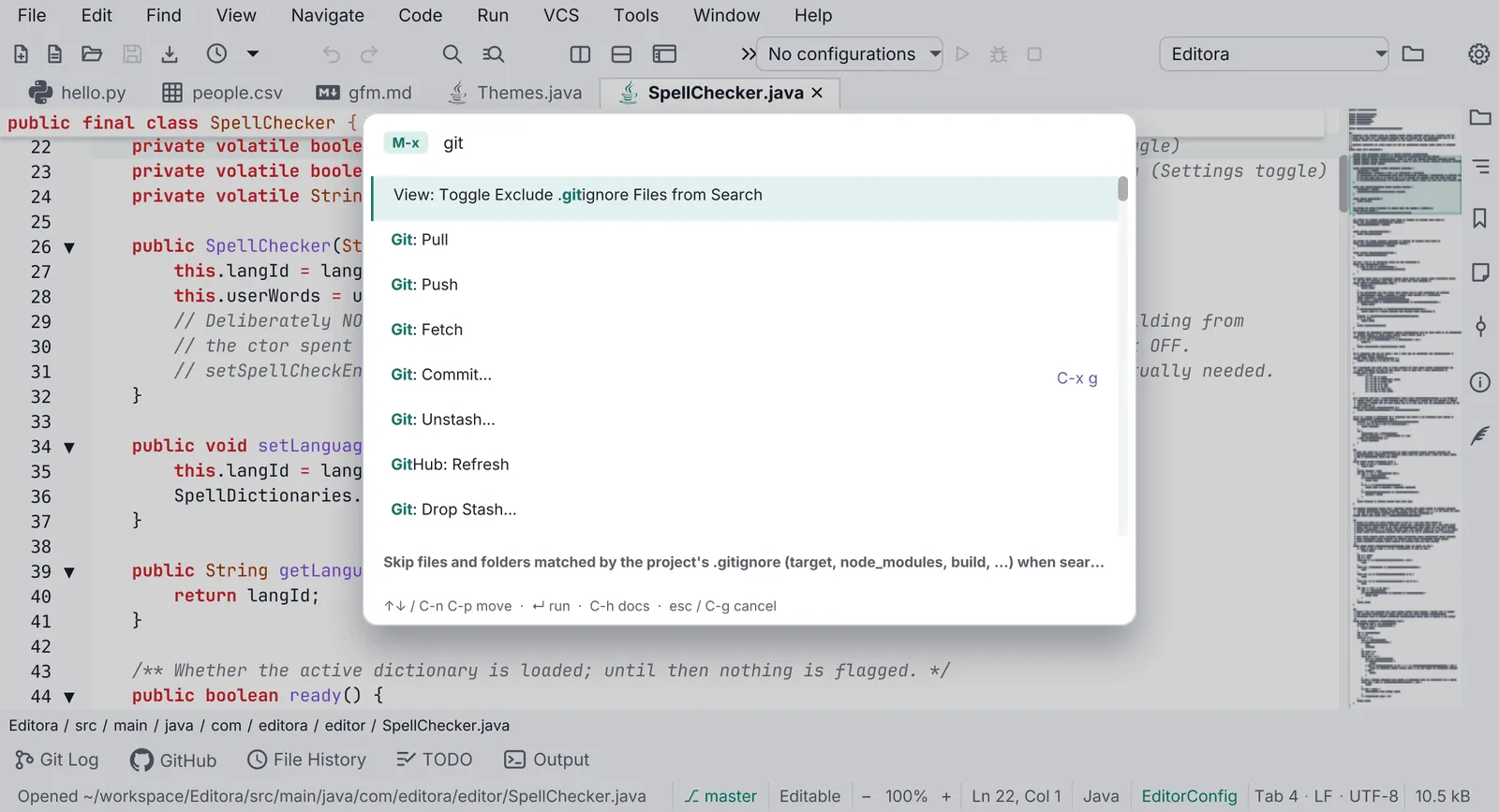
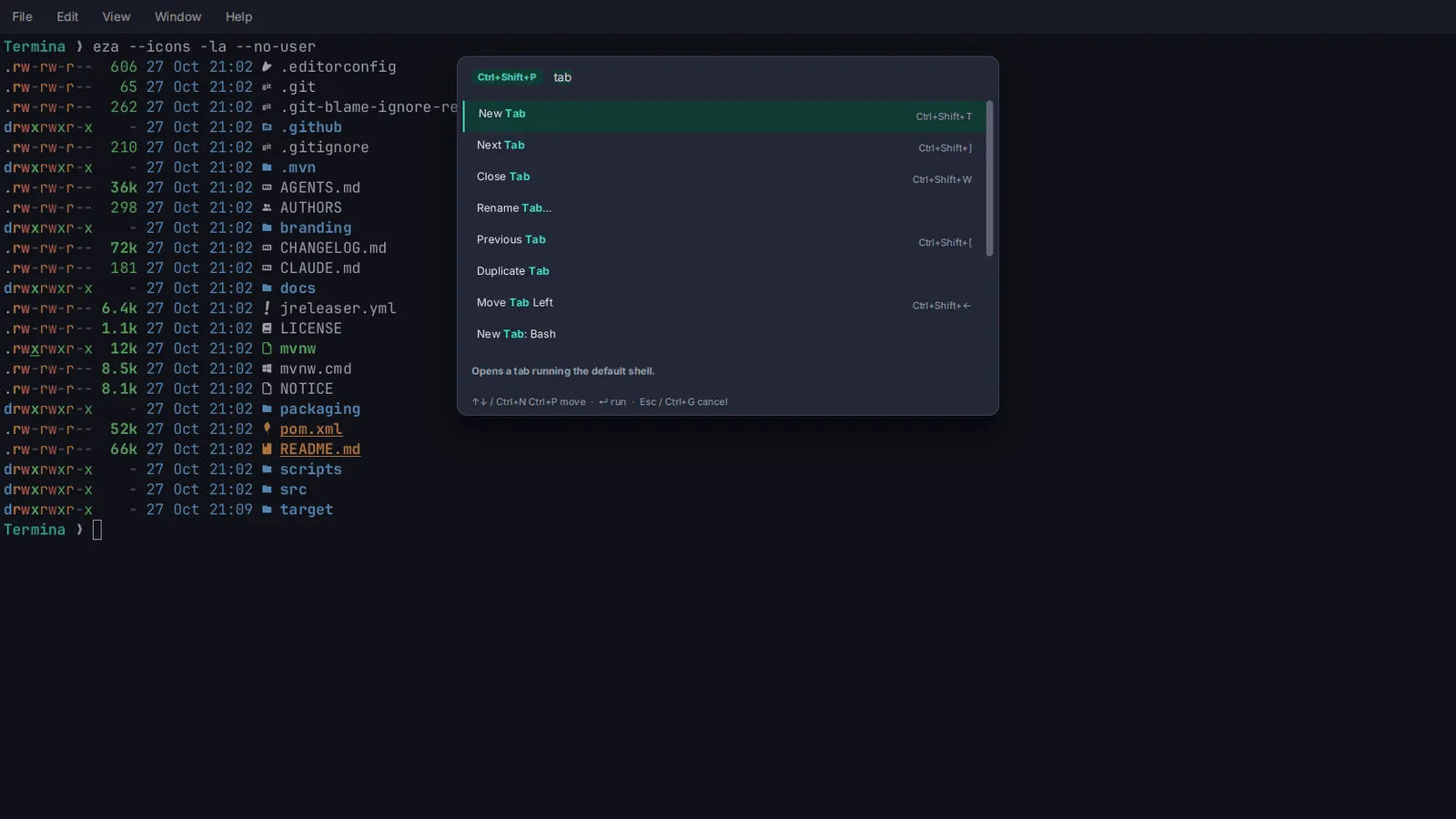
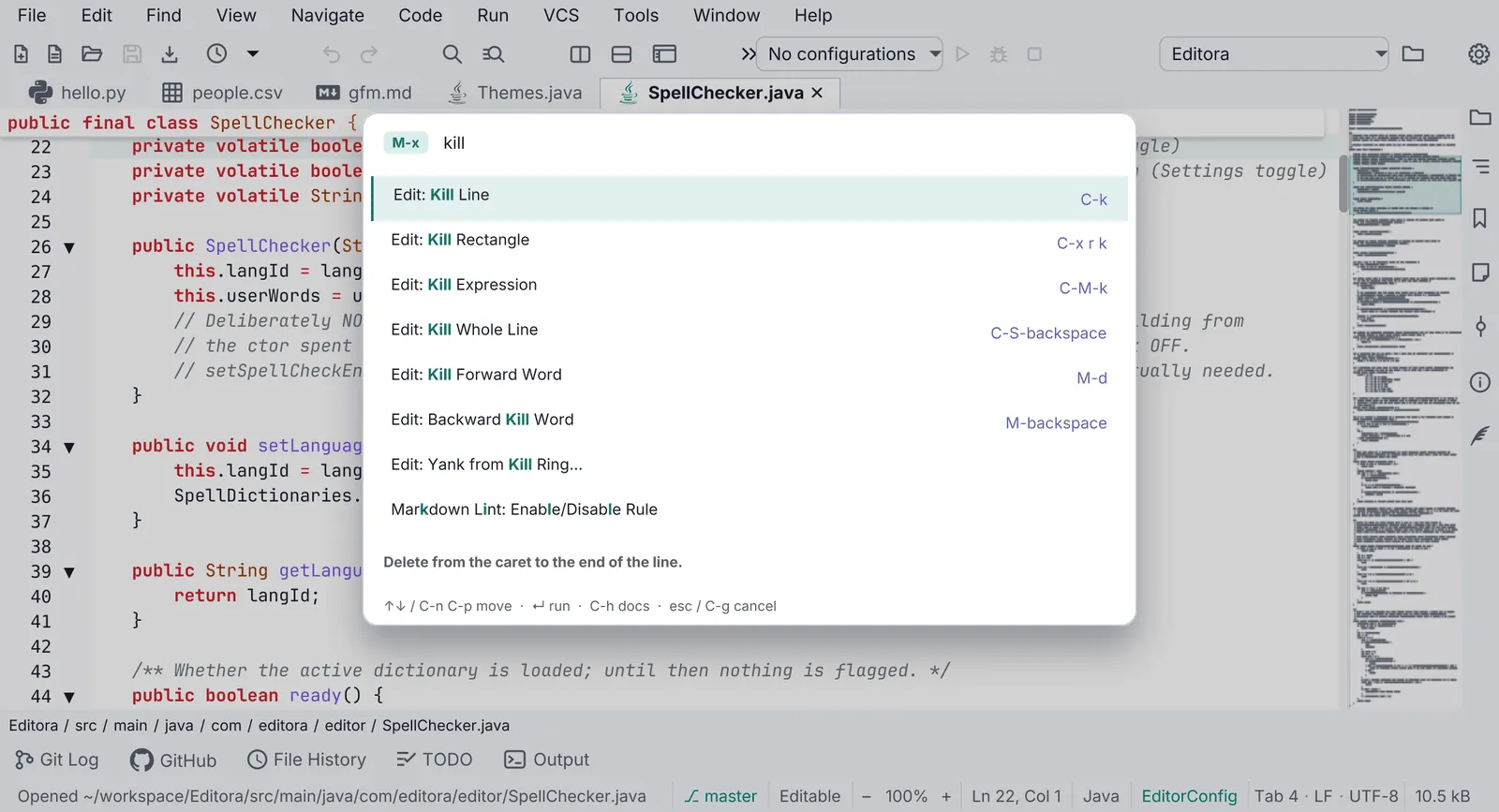
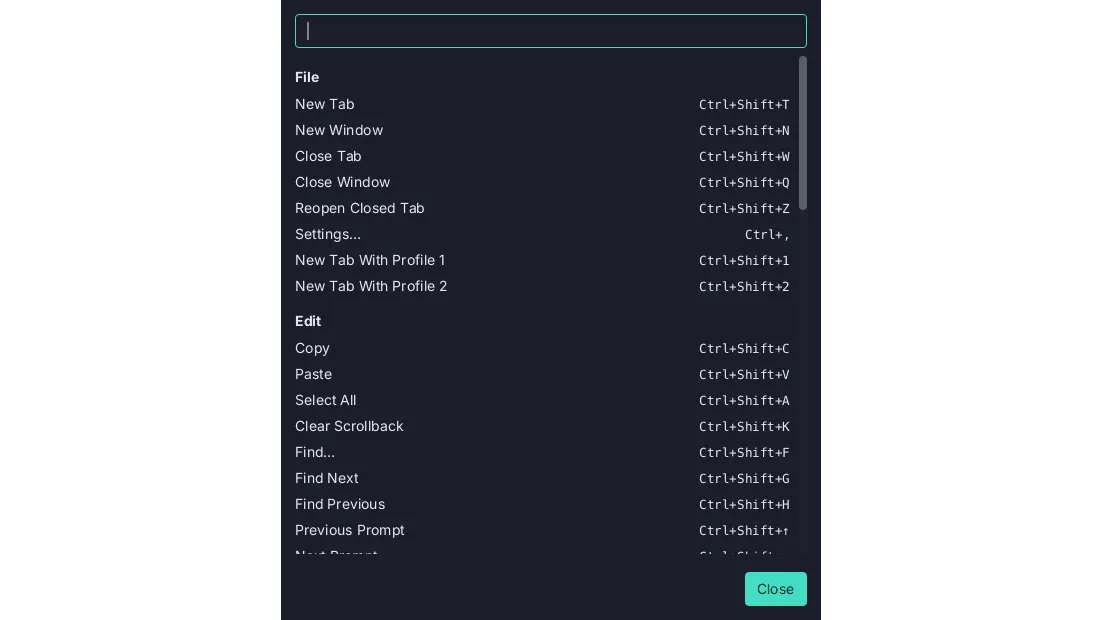
| KBD-05 | MUST | The Command Palette opens with M-x in the Emacs keymap and Ctrl+Shift+P (Cmd+Shift+P on
macOS) in the others; the IntelliJ keymap may use IntelliJ’s own Find Action chord, Ctrl+Shift+A (Cmd+Shift+A),
instead. An app with one key table and no Emacs keymap, which is a terminal app’s own keymap (KBD-09) or
the built-in table of an app that ships no keymap files, counts as one of the others: it binds Ctrl+Shift+P
(Cmd+Shift+P on macOS). An app that ships no keymap files owes this chord and fails KBD-09 all the same: KBD-09
requires the files of every app.
|
| KBD-06 | SHOULD | The palette matches fuzzily over the command’s title and over the words of its id or its
keywords; the description is shown, not matched. A query that names a command’s title outranks a fuzzy hit. Each
row shows the command’s binding in the active keymap. See the
Command Palette template.
|
| KBD-07 | MUST | The palette and every picker (a card that lists choices to filter and pick one from:
QOPEN-01) are in-scene overlays in the window’s root StackPane, never a
javafx.stage.Popup.
|
| Keymaps | ||
| KBD-09 | MUST | Except in a terminal app, Emacs and CUA keymaps ship as JSON resources, emacs.json and
cua.json, CUA with a cua.mac.json variant where Cmd replaces Ctrl. A terminal’s keys belong to the program it
runs (C-a, M-x reach the shell), so a terminal app ships one keymap of its own instead, keymap.json and
keymap.mac.json, binding its commands to chords programs don’t use. Neither file binds a plain Ctrl or Alt
(Option on macOS) with a letter: off macOS that leaves Ctrl+Shift+T, not Ctrl+T, and on macOS Cmd+T,
since no program in the terminal receives Cmd.
|
| KBD-10 | SHOULD | Except in a terminal app (KBD-09), an app also ships IntelliJ, VS Code and Sublime
keymaps as JSON resources beside its Emacs and CUA keymaps: intellij.json, vscode.json and sublime.json,
each with its .mac.json variant.
|
| KBD-21 | MUST | A keymap’s .mac.json variant binds the same commands as the keymap it varies. A chord may
differ, to put Cmd where the other has Ctrl, to follow the macOS keymap of the editor it copies, or where
macOS keeps the chord for itself (Cmd+Space, Cmd+Tab). See Same on every OS.
|
| KBD-11 | MUST | Keymaps are applied in layers: base keymap → user overrides → plugin keymaps → the user’s own
bindings again. An app without plugins has the first two.
|
| KBD-12 | SHOULD | A keymap editor in Settings lists every command with its chord, is searchable, and warns of
conflicts.
|
| KBD-13 | SHOULD | No command’s chord is written into translated text. Every other label that shows a chord (a
hint, the palette, the status bar) shows the binding from the active keymap; tooltips are
TBAR-03 and menu rows MENU-15. Fixed keys of a control
(Enter, Tab, Esc, arrows) and keys meant for another program may be written.
|
| KBD-14 | SHOULD | A multi-key prefix ( C-x …) shows a which-key style hint listing the possible next keys.
|
| Focus and accessibility | ||
| KBD-15 | MUST | Every interactive control is reachable with Tab and operable with Space or Enter. A control is
the exception when the keyboard does what it does another way: the buttons of a toolbar stay out of the Tab order
(TBAR-02, which says what a toolbar is: a bar of labeled buttons is not one,
and its buttons are held to this rule), and the find-bar and filter controls that
FIND-16 names may leave it. See Accessibility.
|
| KBD-16 | MUST | Every button, toggle, menu button, link, combo box, check box, radio button and text field shows
the focus ring when the keyboard focuses it. The ring is one layer of :focus-visible rules in the app stylesheet,
after every rule that sets a border or background on the same controls, since rules of equal specificity are decided
by order. Its color and contrast are ICON-12.
|
| KBD-22 | SHOULD | The focus ring is 2 px wide at the default zoom and sits just outside the control with a
1 px gap: a border with negative insets, which adds nothing to the control’s own, so focusing a control never moves
the layout. Two kinds of control draw it inside instead, at the same 2 px and still without moving anything: a
text field, whose own focus border is widened, and a control flush with the window’s edge, where a ring outside
would be cut off.
|
| KBD-18 | SHOULD | A row that turns a setting on or off (in Settings, a panel or a dialog) uses a switch the
keyboard operates: it takes focus, Space toggles it, and its accessible role is TOGGLE_BUTTON.
|
Commands
Section titled “Commands”- KBD-01 MUST Every user-facing action is a command (an id, a title and a runnable) registered in one
command registry (Editora’s
CommandandCommandRegistry).- Check (code): what a menu item, a toolbar button, a palette row or a key binding does is a registered command: the control runs the command’s id through the registry, or calls what the command’s runnable calls. No button, menu row or key handler does work no command can reach.
- Reference: Editora
command/Command.java,command/CommandRegistry.java. Editora doesn’t hold the rule everywhere yet: the Clear button of its Message Log (ui/MessageLogPopup.java) empties the log in its own handler, and the Previous Run and Save Output buttons of its build console (ui/BuildToolPanel.java) work the same way, with no command behind any of the three. Termina doesn’t either. These buttons, among others, do their work in handlers of their own with no command behind them: Clear in its Message Log (ui/MessageLogWindow.java), Refresh, Copy, Export and Clear in its Debug Log (ui/DebugLogWindow.java), and Import theme in Settings (ui/SettingsWindow.java).
- KBD-02 SHOULD Command ids are dotted and grouped by area, as in
file.open,view.toggleStatusBarandhelp.reportProblem. A rule that names a command’s id requires that id; these three are examples.- Check (code): every registered id is two or more names joined by dots, and the first is the area the command
belongs to:
file.open, and with a sub-areagit.log.checkout. - Reference: Editora
ui/MenuBarModel.java.
- Check (code): every registered id is two or more names joined by dots, and the first is the area the command
belongs to:
- KBD-03 MUST A command’s title comes from
command.<id>and its one-line palette description fromcommand.<id>.descin the message catalogs.- Why: a registered command is then localized and discoverable without extra work.
- Check (code): every registered command has a
command.<id>and acommand.<id>.desckey in the message catalogs, and the registry reads its title and description from them. A catalog parity test that walks the registered commands and fails on a missing key is the surest evidence. - Reference: the app template’s
CommandSweepFxTest(everyCommandIsLocalizedAndRuns) and Mirada’sCommandCatalogTest(everyCommandHasItsTitleAndDescriptionInTheCatalog) walk the registered commands. Editorai18n/messages.properties; itsMessagesTest(everyCommandTitleHasAMatchingDescription) walks the catalog instead, so it finds a title with no description but not a registered command with neither.
- KBD-04 SHOULD A command that cannot run in the current context is shown grayed, with a tooltip that says
why, not hidden.
- Check (code): the palette and menus list a disabled command with a reason, rather than filtering it out.
- Reference: Editora
ui/Chrome.java(paletteEnabled,disabledReason). The app template’s menu rows of a command that can’t run stay, grayed, with the reason as their tooltip (ui/AppMenus.java,showAvailability;RightClickMenusFxTest,anUnavailableRowStaysAndSaysWhy), and its palette lists such a command with the reason.
Command Palette
Section titled “Command Palette”- KBD-05 MUST The Command Palette opens with
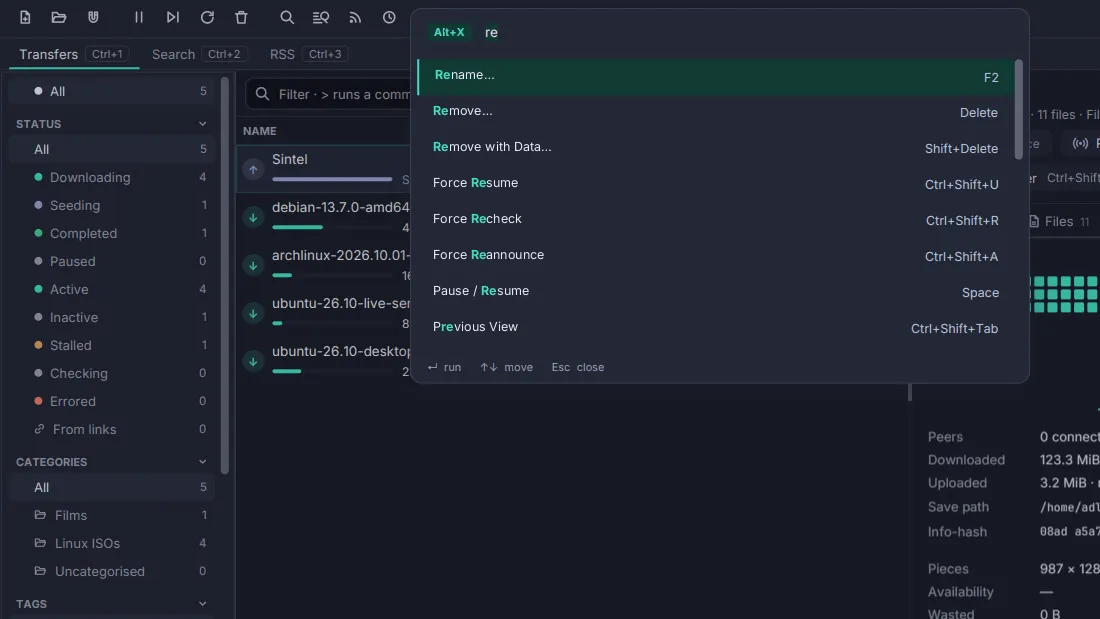
M-xin the Emacs keymap andCtrl+Shift+P(Cmd+Shift+Pon macOS) in the others; the IntelliJ keymap may use IntelliJ’s own Find Action chord,Ctrl+Shift+A(Cmd+Shift+A), instead. An app with one key table and no Emacs keymap, which is a terminal app’s own keymap (KBD-09) or the built-in table of an app that ships no keymap files, counts as one of the others: it bindsCtrl+Shift+P(Cmd+Shift+Pon macOS). An app that ships no keymap files owes this chord and fails KBD-09 all the same: KBD-09 requires the files of every app.- Check (code): each bundled keymap binds that chord to the palette command, and so does the one key table of an app that has no keymap files. An app whose chord opens the palette from a handler, with no palette command registered, passes this rule and fails PAL-01 for the missing command.
- Reference: Editora
keymaps/emacs.json(M-x),cua.jsonandvscode.json(C-S-p),cua.mac.json(Cmd-S-p), all topalette.show;intellij.jsonbindsC-S-a. Termina’s one keymap bindsShortcut+Shift+P, which isCtrl+Shift+Pinkeymap.jsonandCmd+Shift+Pinkeymap.mac.json, and nux, which ships no keymap file, binds the same chord inApp. Torrenta and Modula don’t yet: Torrenta’s one key table opens the palette withAlt+Xalone (ui/Chords.java), and Modula’s key filter tests forCtrlon every OS, so its chord isCtrl+Shift+Pon macOS too (ui/RadioPane.java).
- KBD-06 SHOULD The palette matches fuzzily over the command’s title and over the words of its id or its
keywords; the description is shown, not matched. A query that names a command’s title outranks a fuzzy hit. Each
row shows the command’s binding in the active keymap. See the
Command Palette template.
- Check (code): the palette’s matcher matches the query fuzzily against each command’s title and finds a command by a word of its id or a keyword that its title doesn’t carry; a query that spells a command’s title ranks that command above the fuzzy hits; the description is drawn and never matched, and each row draws the binding the active keymap gives the command. A ranking test that asserts the order is the surest evidence.
- Reference: Editora
ui/CommandPalette.java(orderedMatches),search/FuzzyMatch.java. It scores the title first; when the title doesn’t match, the id’s namespace word as a keyword (Command.keywords); then the names IntelliJ and VS Code give the command (command/OtherIdeNames.java). It doesn’t match the rest of the id or the description, which is shown under the list.CommandPaletteRankTestholds the order (aCommandIsFoundByItsNamespaceWhenItsTitleDoesNotCarryIt,aKeywordMatchRanksBelowEveryTitleMatch, and for a typed titleanExactTitleLeadsAnotherCommandsAliasandaWholeOneWordTitleLeads). The app template’sui/Picker.java(rank, withidWords) matches the title fuzzily and the id’s words, never the description, and puts a title that holds the query first (PickerFxTest,ranksTitlesFirstAndSkipsUnavailableRows).
- KBD-07 MUST The palette and every picker (a card that lists choices to filter and pick one from:
QOPEN-01) are in-scene overlays in the window’s root
StackPane, never ajavafx.stage.Popup.- Why: on Windows a Popup does not reliably take OS keyboard focus, and the whole app can stop receiving keystrokes.
- Check (code): the palette and every picker add their node to the root
StackPane; none creates aPopup. - Reference: Editora
ui/OverlayHost.java, the one host installed in the scene’s rootStackPane, which shows the palette (ui/CommandPalette.java), the picker (ui/QuickOpen.java) and the picker’s relatives (QOPEN-12).
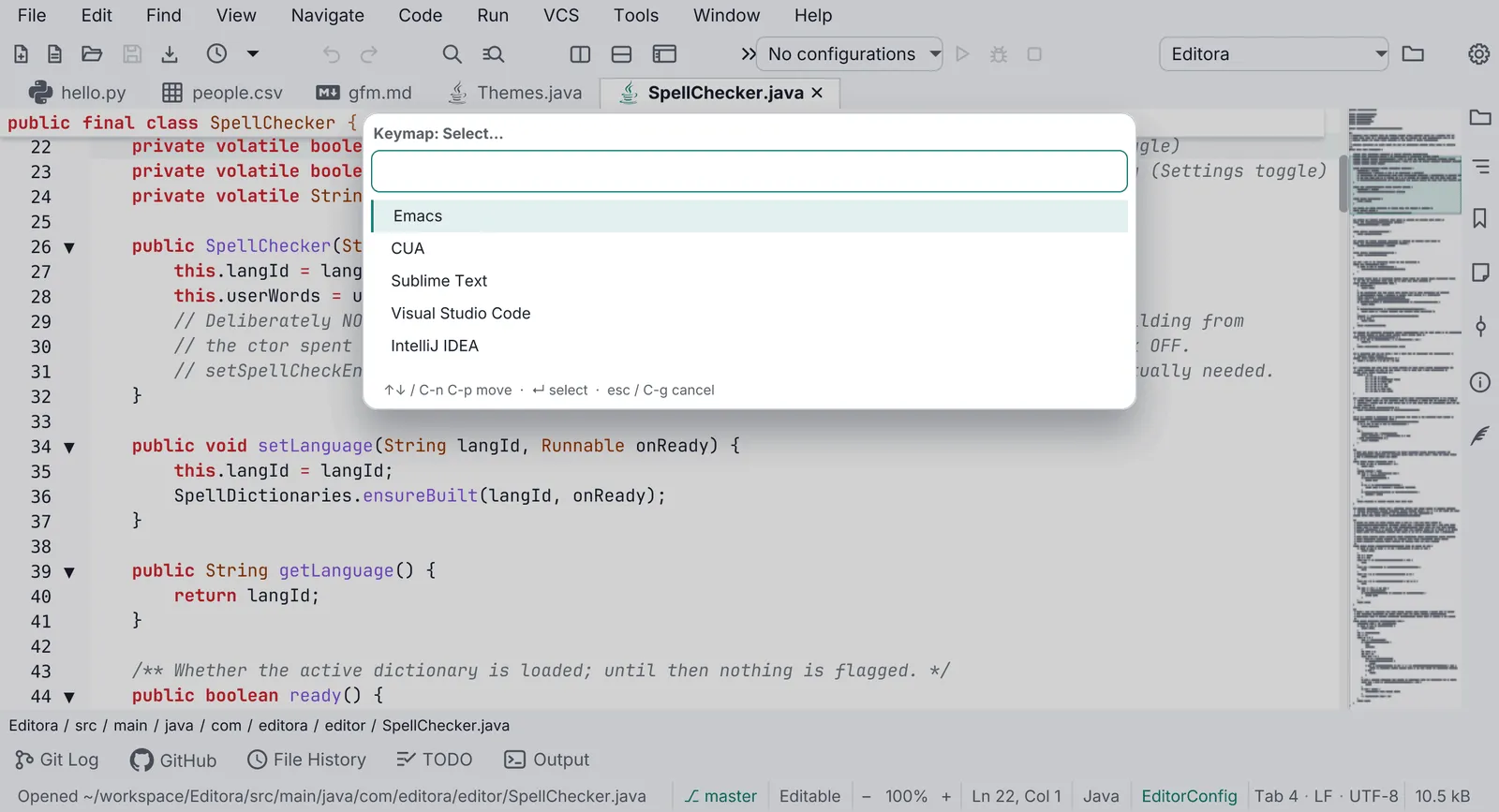
Every other list choice (recent files, themes, keymaps, a setting’s values) uses the same picker: QOPEN-01.
Keymaps
Section titled “Keymaps”- KBD-09 MUST Except in a terminal app, Emacs and CUA keymaps ship as JSON resources,
emacs.jsonandcua.json, CUA with acua.mac.jsonvariant where Cmd replaces Ctrl. A terminal’s keys belong to the program it runs (C-a,M-xreach the shell), so a terminal app ships one keymap of its own instead,keymap.jsonandkeymap.mac.json, binding its commands to chords programs don’t use. Neither file binds a plainCtrlorAlt(Optionon macOS) with a letter: off macOS that leavesCtrl+Shift+T, notCtrl+T, and on macOSCmd+T, since no program in the terminal receivesCmd.- Why: an Emacs keymap in a terminal would take the shell’s own keys away from it:
Ctrl+Wdeletes a word,Ctrl+Cinterrupts,Alt+FandAlt+Bmove by word. The shell reads the same keys on macOS, whereOptionwith a letter also types a character. - Check (code):
emacs.json,cua.jsonandcua.mac.jsonare in the app’s resources. In a terminal app,keymap.jsonandkeymap.mac.jsonare there instead, and no default binding in either file isCtrlalone orAltalone with a letter. Read each chord as the OS reads it: a modifier that stands for the OS’s own shortcut key (JavaFX’sShortcut, as Termina writes it) isCtrlinkeymap.jsonandCmdinkeymap.mac.json. - Reference: Editora
src/main/resources/com/editora/keymaps/; Termina’skeymaps/, whoseKeymapTest(offMacOsAnApplicationChordNeverTakesPlainCtrlAndALetter) holds theCtrlhalf off macOS; no test holds theAlthalf or readskeymap.mac.json, where every chord carriesCmdtoday.
- Why: an Emacs keymap in a terminal would take the shell’s own keys away from it:
- KBD-10 SHOULD Except in a terminal app (KBD-09), an app also ships IntelliJ, VS Code and Sublime
keymaps as JSON resources beside its Emacs and CUA keymaps:
intellij.json,vscode.jsonandsublime.json, each with its.mac.jsonvariant.- Check (code):
intellij,vscodeandsublime.jsonand.mac.jsonfiles are in the resources. An app that ships a terminal’s keymap,keymap.jsonandkeymap.mac.jsonwith noemacs.jsonand nocua.json(KBD-09), needs none of them. - Command:
[ -f pom.xml ] || { echo 'not an app root: no pom.xml here'; exit 1; }; has() { find src/main/resources -name "$1" | grep -q .; }; if has keymap.json && has keymap.mac.json && ! has emacs.json && ! has cua.json; then exit 0; fi; ! for k in intellij vscode sublime; do for f in "$k.json" "$k.mac.json"; do has "$f" || echo "missing $f"; done; done | grep . - Reference: Editora
src/main/resources/com/editora/keymaps/. Termina ships the terminal’s two files only (keymaps/). The app template ships all five, each IDE keymap with its.mac.json(PRESETSincommand/Keymap.java). Mirada ships Emacs and CUA and none of these three yet; Torrenta, Modula and nux ship no keymap file.
- Check (code):
- KBD-21 MUST A keymap’s
.mac.jsonvariant binds the same commands as the keymap it varies. A chord may differ, to putCmdwhere the other hasCtrl, to follow the macOS keymap of the editor it copies, or where macOS keeps the chord for itself (Cmd+Space,Cmd+Tab). See Same on every OS.- Why: a command with no chord on one OS is a command that user never finds from the keyboard.
- Check (code): each keymap file and its
.mac.jsonvariant bind the same set of command ids: no command is bound in one and missing from the other. An app that ships no keymap files has no pair to compare and fails with KBD-09. A test that loads both and compares the commands they bind is the surest evidence. - Reference: Editora
KeymapsTest(guiKeymapsBindSameCommandSetOnBothPlatforms), Termina’sKeymapTest(bothPlatformsBindTheSameCommands) and the app template’sKeybindingsTest(cuaHasAMacVariantWhereCmdReplacesCtrl). Mirada’scua.jsonandcua.mac.jsonbind the same commands, with no test that compares the two.
- KBD-11 MUST Keymaps are applied in layers: base keymap → user overrides → plugin keymaps → the user’s own
bindings again. An app without plugins has the first two.
- Why: the user always has the last word, and a plugin can still use a chord the user freed.
- Check (code): one place applies the layers in that order.
- Reference: Editora
ui/KeymapLayers.java.
- KBD-12 SHOULD A keymap editor in Settings lists every command with its chord, is searchable, and warns of
conflicts.
- Check (by hand): open Settings → Keymap, search, and bind a chord that is taken.
- Reference: Editora
ui/SettingsKeymapsPage.java; conflicts fromKeybindingEdits.conflicts, and the defaults a chord would take fromEditorSettingsCoordinator.takenDefaults.
- KBD-13 SHOULD No command’s chord is written into translated text. Every other label that shows a chord (a
hint, the palette, the status bar) shows the binding from the active keymap; tooltips are
TBAR-03 and menu rows MENU-15. Fixed keys of a control
(Enter, Tab, Esc, arrows) and keys meant for another program may be written.
- Check (code): no message catalog value names a command’s chord (
Ctrl+,Cmd+,C-x,M-x); chords are rendered by one formatter. - Reference: Editora
command/ChordFormat.java, the one place a binding is rendered. Editora’scommand.edit.universalArgumenttitle still carriesC-u.
- Check (code): no message catalog value names a command’s chord (
- KBD-14 SHOULD A multi-key prefix (
C-x …) shows a which-key style hint listing the possible next keys.- Check (by hand): press
C-xin the Emacs keymap and wait. - Reference: no app lists the next keys yet. Editora echoes only the pending prefix (
C-x -) in the status bar (command/KeyDispatcher.java).
- Check (by hand): press
Focus and accessibility
Section titled “Focus and accessibility”- KBD-15 MUST Every interactive control is reachable with Tab and operable with Space or Enter. A control is
the exception when the keyboard does what it does another way: the buttons of a toolbar stay out of the Tab order
(TBAR-02, which says what a toolbar is: a bar of labeled buttons is not one,
and its buttons are held to this rule), and the find-bar and filter controls that
FIND-16 names may leave it. See Accessibility.
- Why: a control that Tab can’t reach is one a keyboard-only or screen-reader user can’t use at all.
- Check (by hand): first in the source, find every control the keyboard cannot focus: one the app takes out of the
Tab order (
setFocusTraversable(false)in the code,-fx-focus-traversable: falsein a stylesheet), and a label or a pane that acts on a click. The keyboard does all that each one does another way: it is a button of a toolbar as The toolbar defines one (TBAR-02; a bar of labeled buttons, such as nux’s, is not one), a find-bar or filter control that FIND-16 lets leave the Tab order (one that fails FIND-16, such as an option’s toggle that no command toggles, fails here too), a list whose text field moves its selection with the arrow keys, or a control whose every action, the rows of its right-click menu included, a registered command also runs. A control only the mouse can work fails the rule, and the source alone shows it. Then in the running app, Tab reaches every other control of each window and dialog, and Space or Enter works it. - Reference: the app template, where each control the keyboard cannot focus has its other way: the status bar’s
echo area, error count and update notice run commands (
view.messageLog,help.openNewRelease:ui/StatusBar.java), its toolbar’s buttons are TBAR-02’s (Icons.toolbarButtoninui/Icons.java), a tool window’s header buttons run commands (ui/ToolWindowManager.java), the find bars’ buttons are FIND-16’s (ui/FindBar.java), and the picker’s list is moved from its field (ui/Picker.java). Editora doesn’t hold the rule everywhere yet: the Clear button of its Message Log (ui/MessageLogPopup.java) and the Previous Run and Save Output buttons of its build console (ui/BuildToolPanel.java) are out of the Tab order with no command and no key behind them. Modula doesn’t either: it takes every control of its window out of the Tab order (RadioPane.keepOutOfFocus) and gives most of what they do a key or a palette row, but a preset’s Rename and Remove are rows of its chip’s right-click menu alone (ui/PresetBar.java). Termina doesn’t either: the regular-expression toggle of its find bar is out of the Tab order, and no command and no key toggles it (ui/SearchBar.java; FIND-16 fails for it too).
- KBD-16 MUST Every button, toggle, menu button, link, combo box, check box, radio button and text field shows
the focus ring when the keyboard focuses it. The ring is one layer of
:focus-visiblerules in the app stylesheet, after every rule that sets a border or background on the same controls, since rules of equal specificity are decided by order. Its color and contrast are ICON-12.- Why: a keyboard user who can’t see where focus is can’t use the window; the ring’s color is a MUST, and so is drawing it.
- Check (code): the app stylesheet holds the ring as one block of
:focus-visiblerules that covers each of these kinds of control the app uses (buttons, toggles, menu buttons, links, combo boxes, check boxes, radio buttons, text fields), and no rule after the block, of the same or higher specificity, sets again what the block sets on those controls (the border; on a text field, the background insets). A test that tabs to each control family and asserts the ring is the surest evidence. - Reference: Editora
app.css(Keyboard focus, one layer for every control), held byFocusRingFxTest, which tabs to each control family. Termina’sapp.cssand Mirada’smirada.cssend with a layer of the same kind; neither app has a test that tabs to a control.
- KBD-22 SHOULD The focus ring is 2 px wide at the default zoom and sits just outside the control with a
1 px gap: a border with negative insets, which adds nothing to the control’s own, so focusing a control never moves
the layout. Two kinds of control draw it inside instead, at the same 2 px and still without moving anything: a
text field, whose own focus border is widened, and a control flush with the window’s edge, where a ring outside
would be cut off.
- Why: a ring drawn on the control’s own border is lost on a flat or filled button, and one that takes room makes the row jump as Tab moves along it. A text field already draws an accent border on focus, so a second ring around it would be one too many.
- Check (code): in the
:focus-visiblerules of KBD-16, the one for the controls that take the outside ring (buttons, toggles, menu buttons, links, combo boxes, the boxes of check boxes and radio buttons, as many of them as the app has) sets-fx-border-width: 2and-fx-border-insets: -3; the one for text fields widens the field’s focus border to 2 px instead (-fx-background-insets: 0, 2px); and a rule that draws the ring inside a control at the window’s edge keeps the 2 px width and takes the room back out of the control’s padding. - Reference: Editora
app.css(Keyboard focus), Termina’sapp.cssand Mirada’smirada.css: the same outside ring, and the same text-field rule (Mirada’s covers text areas too). Editora alone has the second exception:.tool-stripe-button:focus-visibledraws the ring at-fx-border-insets: 1and gives 3 px of padding back, since the stripes sit against the window’s edge. The app template’sapp.csshas the same outside ring and text-field rule; its check boxes and radio buttons take the ring around the whole control, label included, not around the box alone.
- KBD-18 SHOULD A row that turns a setting on or off (in Settings, a panel or a dialog) uses a switch the
keyboard operates: it takes focus, Space toggles it, and its accessible role is
TOGGLE_BUTTON.- Why: a bare AtlantaFX
ToggleSwitchis mouse-only. - Check (code): every row that turns a setting on or off uses a switch that takes focus, toggles on Space and sets
AccessibleRole.TOGGLE_BUTTON(Editora has one class for it,SettingSwitch); a row that uses AtlantaFX’sToggleSwitchas it comes fails. - Reference: Editora
ui/SettingSwitch.java.
- Why: a bare AtlantaFX
Related rules on other pages: every icon-only button gets its name from one helper, TBAR-01; rows wrap instead of being cut short in every language, INTL-04; readable text and its contrast are one rule, ICON-09.
Pauta Next · unreleased changes after 6.1.0 · Changelog · This page in the latest edition