
Message Log
The status bar’s echo line shows one message and replaces it with the next; the Message Log keeps them, so nothing the app said is lost because it scrolled past.
Every app keeps one, session-only and bounded, newest first, with Esc to close and Clear to empty it: DIAG-01. A click on the status bar’s echo area opens it: WIN-01. This page is what the log looks like and how it behaves beyond that.
Rules on this page 7
| ID | Level | Rule |
|---|---|---|
| Spec | ||
| MLOG-08 | SHOULD | The Message Log is a card in the window’s in-scene overlay host, anchored just above the status
bar’s echo area, never a separate window: 773 px wide, its list 336 px high, at the default zoom, holding the
newest 200 messages of the session (the cap DIAG-01 asks for).
|
| Behavior | ||
| MLOG-02 | SHOULD | A click on the status bar’s unread-error count opens the Message Log, as a click on the
echo area does (WIN-01), and so does the view.messageLog command.
|
| MLOG-03 | SHOULD | The active keymap’s cancel chord or a click outside closes the Message Log, as Esc does.
|
| MLOG-04 | SHOULD | The Message Log copies the selected entries on the platform’s copy chord, Ctrl+C
(Cmd+C on macOS), in every keymap, and on the active keymap’s copy chord too.
|
| MLOG-05 | SHOULD | A message’s severity comes from its key: a status.* key whose last segment contains fail
or error is an error, one containing cannot or invalid a warning. Name new keys accordingly, or post the
message as an error directly (Editora’s status bar has an error channel for that).
|
| MLOG-06 | SHOULD | Opening the Message Log, or clearing it, resets the unread-error count.
|
| MLOG-07 | SHOULD | An unread error is never evicted from the Message Log silently: the unread-error count
keeps it even when the entry drops off the end.
|
Anatomy
Section titled “Anatomy”Messages1
Filter messages…
214:32:07Saved Shelf.java3
14:31:52Language server for Java failed to start: jdtls was not found4
14:30:18Settings sync: not connected, retrying
14:29:40Line numbers: on
14:29:05Opened ~/workspace/shelf/src/main/java/com/example/shelf/Shelf.java
- 1Title "Messages", 14 px bold.
- 2Filter, focused on open. Filters as you type; ↓ or Enter moves into the results without leaving the field.
- 3Entry. The time as
HH:mm:ss(11 px, muted, in the UI font like the rest of the card, not monospace) and the message as it appeared in the echo line. Newest first. - 4Severity colors the message, not the row: errors red, warnings amber, information in the default color. The time stays muted.
- 5Actions: Copy (the selected entries as text, or every listed entry when none is selected), Clear (empties the session log and its unread count), and Open Doctor: messages carry no actions of their own, and a missing tool or a server that would not start is where Doctor helps.
- 6Key hint, muted, 11 px.
- 7Echo line. The status bar's latest message; a click opens the log.
- 8Unread errors. A red count beside the echo line while errors have arrived since the log was last opened; a click opens the log.
| Property | Value | Reference |
|---|---|---|
| Kind | A card in the shared in-scene overlay host, anchored just above the status bar’s echo area, over the window | MessageLogPopup.show, OverlayHost |
| Size | 773 px wide; the list 336 px high, scrolling past that | WIDTH, LIST_HEIGHT |
| Card | -color-bg-overlay, radius 12, like the palette | .message-log |
| Rows | Padding 2 4, radius 5; selected row -state-sel | .message-log-list .list-cell |
| Capacity | The newest 200 messages; older ones drop off | MessageLog.MAX_ENTRIES |
| Repeats | A message repeated within 2 s moves to the top as one entry, unread once | REPEAT_MILLIS |
| Lifetime | This session only, in memory. Not written to disk: the Debug Log is the persistent record | MessageLog |
| Blank messages | Not recorded (a blank message only clears the echo line) | MessageLog.add |
- MLOG-08 SHOULD The Message Log is a card in the window’s in-scene overlay host, anchored just above the status
bar’s echo area, never a separate window: 773 px wide, its list 336 px high, at the default zoom, holding the
newest 200 messages of the session (the cap DIAG-01 asks for).
- Why: the log answers “what just happened?” next to the line that said it; a separate window, or another size and cap, makes the same log look and behave differently from app to app.
- Check (code): the log adds its node to the overlay host (no
Stage), with width 773, list height 336 and a cap of 200. - Reference: Editora
ui/MessageLogPopup.java(WIDTH,LIST_HEIGHT) andui/MessageLog.java(MAX_ENTRIES); the app template’sui/MessageLogView.java. Torrenta’s card is 640 × 300, and Termina’s log is a separate window that keeps 500 messages.
Behavior
Section titled “Behavior”- MLOG-02 SHOULD A click on the status bar’s unread-error count opens the Message Log, as a click on the
echo area does (WIN-01), and so does the
view.messageLogcommand.- Check (code): the unread-error count runs
view.messageLogon a click, and the command is registered. - Reference: Editora
StatusBar(echo,unreadErrors),StatusBar.showMessageLog.
- Check (code): the unread-error count runs
- MLOG-03 SHOULD The active keymap’s cancel chord or a click outside closes the Message Log, as Esc does.
- Check (code): the Message Log closes on the chord the active keymap binds to its cancel command, not on a fixed
Ctrl+G, and a press outside the log closes it: on the backdrop, where the log is the in-scene card MLOG-08 asks for. In an app with one key table (a terminal app’s keymap, or the built-in table of an app that ships no keymap files), the chord is the one that table binds to a cancel command; where it binds none, Esc and the press outside are all there is to test. - Reference: Editora
OverlayHost, which hides the card on a press on its backdrop and onPickerKeys.isCancel: Esc, or the chord the keymap binds toedit.cancel(Editora’s id;C-gin its Emacs keymap). ItsMessageLogPopupalso closes onCtrl+Gwhatever the keymap, though the CUA keymap bindsC-gtonav.goToLine; its handler readsAlt+Gtoo, which the Emacs keymap’sM-gprefix takes first. The app template’s Message Log (ui/MessageLogView.java) is shown through itsui/OverlayHost.java, which closes it the same way, on the keymap’sedit.cancelchord (cancelOn). Elsewhere the chord is fixed:Ctrl+Gin Termina (ui/MessageLogWindow.java) and Mirada (ui/MessageLogView.java). Torrenta’s (ui/MessageLogPopup.java) closes on Esc and on a press on its backdrop: Torrenta has no keymap and no cancel command, so the chord asks nothing more of it.
- Check (code): the Message Log closes on the chord the active keymap binds to its cancel command, not on a fixed
- MLOG-04 SHOULD The Message Log copies the selected entries on the platform’s copy chord,
Ctrl+C(Cmd+Con macOS), in every keymap, and on the active keymap’s copy chord too.- Check (code): the Message Log’s key handling copies the selected entries on C with the platform’s shortcut
modifier down (
isShortcutDown), whatever the active keymap binds to copy, and also on the chord the active keymap binds to its copy command (M-win an Emacs keymap), read from the keymap and not written into the handler. - Reference: for the platform’s chord, Editora
MessageLogPopup.copySelection, on a fixed shortcut-down C, and the Message Logs of Torrenta (ui/MessageLogPopup.java), Termina (ui/MessageLogWindow.java), Mirada (ui/MessageLogView.java) and the app template (ui/MessageLogView.java), each the same way. For the keymap’s chord, no app yet: none of the five reads the keymap’s copy binding in its log, and Editora’s Emacs keymap binds copy toM-w, which its log does not read. The app template meets the rule all the same: none of its keymaps binds a copy command, so there is no second chord to read, and its key dispatcher steps aside while the log, an overlay, is open (KeyDispatcher), soCtrl+Creaches it under the Emacs keymap’sC-cprefix too. Editora doesn’t hold the first half under that keymap on Windows and Linux either: the keymap starts longer chords withC-c, a prefix the window’s key dispatcher (command/KeyDispatcher.java) consumes in a scene filter, ahead of the log’s own.
- Check (code): the Message Log’s key handling copies the selected entries on C with the platform’s shortcut
modifier down (
- MLOG-05 SHOULD A message’s severity comes from its key: a
status.*key whose last segment containsfailorerroris an error, one containingcannotorinvalida warning. Name new keys accordingly, or post the message as an error directly (Editora’s status bar has an error channel for that).- Check (code): one function gives a message’s severity from its key by those rules (Editora’s
StatusSeverity.ofKey). A test that asserts it is the surest evidence. - Reference: Editora
ui/StatusSeverity.java(ofKey),StatusSeverityTest.
- Check (code): one function gives a message’s severity from its key by those rules (Editora’s
- MLOG-06 SHOULD Opening the Message Log, or clearing it, resets the unread-error count.
- Check (code): opening the Message Log marks it read, and clearing it zeroes the count (Editora’s
markReadandclear). - Reference: Editora
MessageLog.markRead,MessageLog.clear,StatusBar.showMessageLog.
- Check (code): opening the Message Log marks it read, and clearing it zeroes the count (Editora’s
- MLOG-07 SHOULD An unread error is never evicted from the Message Log silently: the unread-error count
keeps it even when the entry drops off the end.
- Check (code): the Message Log counts unread errors apart from the entries it holds, so dropping an unread error at the cap leaves the count as it was. A test that asserts it is the surest evidence.
- Reference: Editora
MessageLogSeverityTest(anEvictedErrorStillCounts).
| Key | English |
|---|---|
messagelog.title | Messages |
messagelog.filter | Filter messages… |
messagelog.empty | No messages yet |
messagelog.copy / messagelog.clear | Copy / Clear |
messagelog.doctor | Open Doctor |
messagelog.hint | Esc to close |
In the apps
Section titled “In the apps”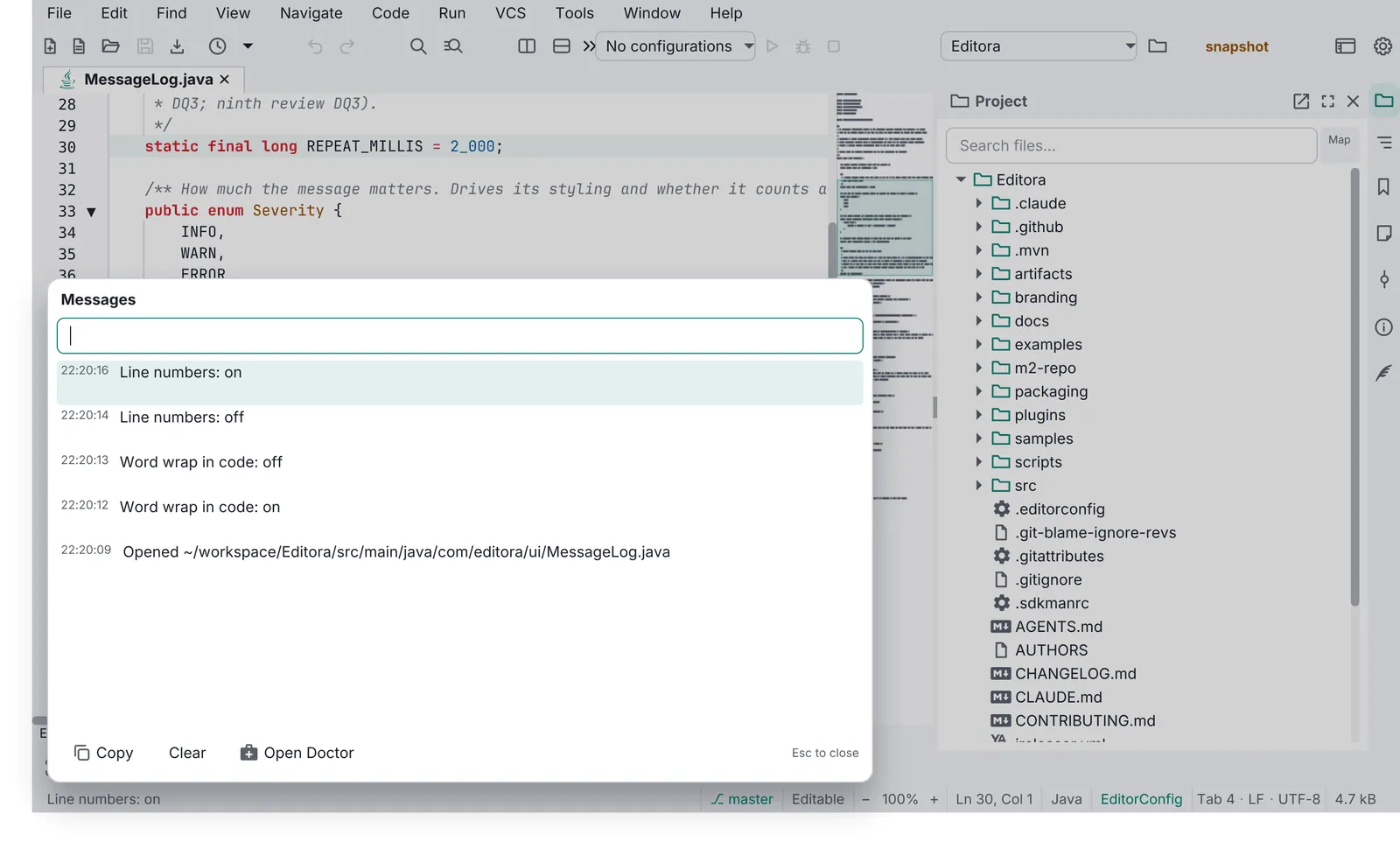
Pauta 6.1.0 · · Changelog · Permanent link to this page in 6.1.0