
Window shell
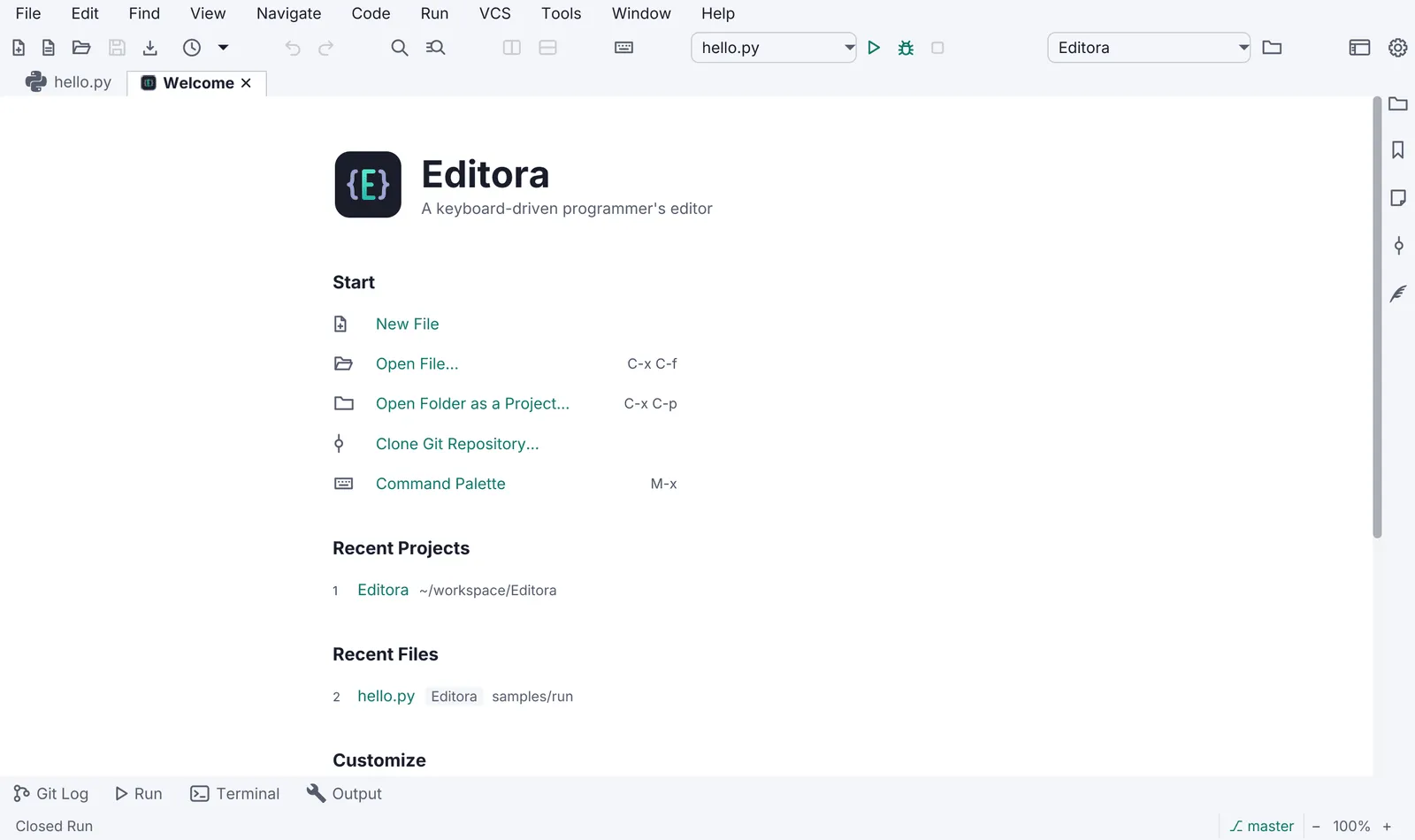
The window shell is what every app has around its content: the status bar and its echo area, the menu bar in the title bar, dialogs and the order of their buttons, the window’s size and place kept across launches, zoom, and Quit. A user meets these parts before any of the app’s own features, so they look and work the same in every app, and on every OS apart from the places Same on every OS lists (the macOS application menu among them). The Welcome page and the About window have templates of their own.
Rules on this page 11
| ID | Level | Rule |
|---|---|---|
| WIN-01 | MUST | The main window has a status bar, shown by default; the user may hide it. Its left side is the
echo area: one line of feedback for the last action, errors in red and warnings in amber. Clicking it opens the
Message Log (DIAG-01).
|
| WIN-03 | MUST | In an app with a menu bar, the menu bar sits in the title bar by default on Windows and Linux:
JavaFX 27’s HeaderBar with StageStyle.EXTENDED carries the menu, and a setting that starts on lets the user
fall back to a decorated window. On macOS the menus are in the system menu bar (useSystemMenuBar), and the window
is decorated, or extended with a header that holds no menus.
|
| WIN-04 | SHOULD | Native dialogs go through one helper that attaches the app stylesheet. The UI font reaches
every scene, a dialog’s included, by ICON-01.
|
| WIN-11 | MUST | A dialog’s buttons are in the same order on every OS, with Cancel to the left of every action, as
the Confirm dialog draws them (Cancel, Save and Discard where there are three:
CONF-05): the dialog’s ButtonBar gets one fixed order, never JavaFX’s
default for the OS. See Same on every OS.
|
| WIN-08 | SHOULD | The main window’s size, position and maximized state are restored on the next launch, and
in an app that opens documents or sessions, so are the items that were open. --no-session skipping the restore
is CLI-04.
|
| WIN-09 | SHOULD | In an app with content to zoom (text, an image, a terminal), it zooms from the keyboard
( Ctrl+=, Ctrl+- and Ctrl+0, with Cmd on macOS; = is the key that carries +), kept across launches.
The UI zoom is WIN-12.
|
| WIN-12 | MUST | The app has a UI zoom: one setting scales the whole chrome, the menus
(MENU-16), toolbar, tabs and status bar included. It applies at once, is kept across
launches, and three commands zoom it in, out and back to the default. In an app with content of its own to zoom
(an editor’s text, a terminal’s grid, an image) Ctrl+=, Ctrl+- and Ctrl+0 (Cmd on macOS) stay with the
content zoom (WIN-09) and this rule fixes no chord for the UI zoom’s commands; in an app without,
those chords are the UI zoom’s.
|
| WIN-13 | MUST | Every quit entry point an app has runs one quit method: the Quit row and the app.quit command
(WIN-14 says which of them an app must have), and the system’s own Quit, which on macOS is the
application menu’s and the Dock’s. That method asks what the Confirm dialog rules
require (CONF-01), closes open dialogs and runs the save the app runs
when its window closes, so quitting loses nothing a close would have kept; what an app keeps across launches is
WIN-08. A tray’s Quit is TRAY-04.
|
| WIN-14 | MUST | Every app has a Quit, on every OS: the app.quit command, in the Command Palette, and, where the
app has a File menu or a main menu, a Quit row in that menu that runs the command. A main menu is a menu button in
the window that holds the app’s commands as a menu bar would (Mirada’s ☰, which it shows on every OS). A menu button
that lists one kind of thing is not a main menu (nux’s Profiles and Commands), and neither is a right-click menu
(the only menu Modula has): an app with no File menu and no main menu meets the rule with the command alone. What
Quit does is WIN-13. Closing the last window may end the app as well, but it is never the only way out.
|
| WIN-15 | SHOULD | On macOS, Settings is in the application menu, the one macOS names after the app, and runs
the same command as the Settings row on Windows and Linux. Its row shows the chord the active keymap binds to
that command ( Cmd+, in the CUA keymap: SET-01), appended to the title as
MENU-02 has the system menu bar’s rows show theirs, and the item is given no key equivalent
of its own. About, in the same menu, is ABOUT-01, and the Quit JavaFX puts there
is WIN-13.
|
| WIN-10 | MAY | The window has modes that change how much chrome it shows: Zen shows none, Expert keeps only
the status bar, and Simple shows fewer menus, for new users.
|
- WIN-01 MUST The main window has a status bar, shown by default; the user may hide it. Its left side is the
echo area: one line of feedback for the last action, errors in red and warnings in amber. Clicking it opens the
Message Log (DIAG-01).
- Check (code): the main window builds a status bar that is visible unless the user hid it; the echo label switches between an error and a warning style class, and its click handler runs the Message Log command.
- Reference: Editora
ui/StatusBar.java(status-echo-error,status-echo-warn; a click runsview.messageLog) and the Message Log template. Editora hides and shows the bar withview.toggleStatusBarand a setting, and Zen mode hides it (ui/Chrome.java,statusBar). Termina doesn’t meet the rule yet: its status bar is a setting that starts off (config/Settings.java,showStatusBar).
- WIN-03 MUST In an app with a menu bar, the menu bar sits in the title bar by default on Windows and Linux:
JavaFX 27’s
HeaderBarwithStageStyle.EXTENDEDcarries the menu, and a setting that starts on lets the user fall back to a decorated window. On macOS the menus are in the system menu bar (useSystemMenuBar), and the window is decorated, or extended with a header that holds no menus.- Why: the family looks the same on every OS only if every app starts with the same title bar; an app that ships it off looks like another family.
- Check (code): on Windows and Linux the main stage is created
StageStyle.EXTENDEDwith aHeaderBarthat holds the menu bar, and the setting that falls back to a decorated window defaults to on (in the title bar); on macOS the menu bar setsuseSystemMenuBar, and a header, where the window has one, holds no menus. - Reference: the app template (
config/Settings.java,titleBarMenus = true, read byChrome.usesHeaderBar). Editora (ui/ExtendedWindow.java,ui/MainMenuBar.java), Torrenta and Termina have the setting but start it off. Mirada has no setting: itsui/TitleBar.javais aHeaderBaron aStageStyle.EXTENDEDstage wherever JavaFX supports one, on macOS too. Its header holds the file name and buttons, the main menu’s among them, and no menu bar; on macOSui/MacMenus.javaputs the menus in the system menu bar. Modula and nux have no menu bar.
- WIN-04 SHOULD Native dialogs go through one helper that attaches the app stylesheet. The UI font reaches
every scene, a dialog’s included, by ICON-01.
- Why: a dialog is its own scene and does not inherit the window’s stylesheet.
- Check (code): every
AlertandDialogthe app builds passes through the helper. - Reference: Editora
ui/Dialogs.java(Dialogs.styled), which attachesapp.cssonly. The UI font reaches an Editora dialog another way:App.installUiFontaddsui-font.cssto every window’s scene (ICON-01).
- WIN-11 MUST A dialog’s buttons are in the same order on every OS, with Cancel to the left of every action, as
the Confirm dialog draws them (Cancel, Save and Discard where there are three:
CONF-05): the dialog’s
ButtonBargets one fixed order, never JavaFX’s default for the OS. See Same on every OS.- Why: JavaFX orders a
ButtonBarby the OS it runs on (BUTTON_ORDER_WINDOWS,_MAC_OS,_LINUX), so the same confirmation puts its action on the left on Windows and on the right on macOS and Linux. - Check (code): the dialog helper (WIN-04), or each dialog, calls
setButtonOrderon the dialog pane’sButtonBarwith one order string, the same on every OS, in whichC(CANCEL_CLOSE) comes before the letter of every action button the dialogs use (OforOK_DONE,Y,N,A,UforOTHER).BUTTON_ORDER_WINDOWSon every OS fails: it putsY,NandObeforeC. - Reference: the app template’s
ui/Dialogs.java(BUTTON_ORDER,L_HE+CUYNBXIAO_R, set bystyled, which every dialog of the template goes through), held byDialogsFxTest(everyDialogHasOneButtonOrderAndCatalogWords). Editora’s Git confirmations give their buttons theOK_DONEandCANCEL_CLOSEroles and leave the order to JavaFX.
- Why: JavaFX orders a
- WIN-08 SHOULD The main window’s size, position and maximized state are restored on the next launch, and
in an app that opens documents or sessions, so are the items that were open.
--no-sessionskipping the restore is CLI-04.- Check (code): closing the window saves its size, position and maximized flag, and the open items in an app that has them, and the next launch reads them back and applies them. A test that saves the state and reads it back is the surest evidence.
- Reference: Editora
config/WorkspaceState.java(windowX…windowMaximized),ui/WindowSessionCoordinator.java,App.noSessionFlag; testsAppArgsTest,NoSessionStartupFxTestand, for the window’s geometry,WindowManagerLaunchFxTest(aWindowComesBackAtTheSizeAndPlaceItsSessionRecorded,aWindowThatWasMaximizedComesBackMaximized), which restore a window from a savedworkspace-state.json. No Editora test saves the geometry and reads it back. The app template does both:saveWindowStateinui/MainWindow.javawrites the size, place, maximized state and the open documents tosession.json, and the next launch restores them (ui/DocumentTabs.java;SessionAndWelcomeFxTest,theOpenDocumentsComeBackFromTheSessionFile).
- WIN-09 SHOULD In an app with content to zoom (text, an image, a terminal), it zooms from the keyboard
(
Ctrl+=,Ctrl+-andCtrl+0, withCmdon macOS;=is the key that carries+), kept across launches. The UI zoom is WIN-12.- Check (code): the content’s zoom in, out and reset are commands bound in every keymap, and the zoom level is a saved setting.
- Reference: Editora
view.textZoomIn,view.textZoomOutandview.textZoomReset, kept inSettings.fontZoomand bound toC-=,C--andC-0(keymaps/cua.json); Termina’szoomIn,zoomOutandactualSize, onShortcut+Equals,Shortcut+MinusandShortcut+0(keymaps/keymap.json), kept infont.zoom(config/Settings.java); the app template’sview.zoomIn,view.zoomOutandview.zoomResetfor its documents’ text, bound toCtrl+=,Ctrl+-andCtrl+0(Cmdon macOS) in every keymap it ships and kept intextZoom(config/Settings.java;SessionAndWelcomeFxTest,theDocumentsTextZoomsOnItsOwn).
- WIN-12 MUST The app has a UI zoom: one setting scales the whole chrome, the menus
(MENU-16), toolbar, tabs and status bar included. It applies at once, is kept across
launches, and three commands zoom it in, out and back to the default. In an app with content of its own to zoom
(an editor’s text, a terminal’s grid, an image)
Ctrl+=,Ctrl+-andCtrl+0(Cmdon macOS) stay with the content zoom (WIN-09) and this rule fixes no chord for the UI zoom’s commands; in an app without, those chords are the UI zoom’s.- Why: a person who needs larger text gets it everywhere, and the menus can only follow a zoom that exists.
- Check (code): the chrome’s font sizes come from one root size the setting changes, and its fixed sizes are
multiplied by the zoom, not written as absolute pixels. A change to the setting restyles every open window with
no restart, and the value is saved with the settings and read back at start-up. Three registered commands zoom
it in, out and back to the default. The rule names no ids for them: they are the app’s own. In an app with a
content zoom they are three more commands, with ids that are not the content zoom’s (Mirada’s
view.zoomInand Termina’szoomInzoom the content), and the keymaps bind=,-and0withCtrl(Cmdon macOS) to the content zoom’s commands; in an app without, to the UI zoom’s. - Reference: the app template’s
ui/UiZoom.javaandui/Themes.java(zoom): one setting,uiZoominconfig/Settings.java, scales every pixel size of the stylesheets, the root font size among them, and the sizes the code fixes are bound to the zoom; a change restyles every open window at once. Its commands areview.uiZoomIn,view.uiZoomOutandview.uiZoomReset(ui/Commands.java), onCtrl+Alt+=,Ctrl+Alt+-andCtrl+Alt+0(Cmd+Alton macOS) in its CUA keymaps, which leaveCtrl+=,Ctrl+-andCtrl+0to its documents’ text zoom (WIN-09);UiZoomTestholds the scaling. Editora, Termina and Mirada zoom their content only (view.textZoomIn,zoomIn,view.zoomIn), and Editora writes its menu font as absolute pixels (MainMenuBar.UI_FONT_SIZE,.context-menuinapp.css). Torrenta, Modula and nux have no zoom command.
- WIN-13 MUST Every quit entry point an app has runs one quit method: the Quit row and the
app.quitcommand (WIN-14 says which of them an app must have), and the system’s own Quit, which on macOS is the application menu’s and the Dock’s. That method asks what the Confirm dialog rules require (CONF-01), closes open dialogs and runs the save the app runs when its window closes, so quitting loses nothing a close would have kept; what an app keeps across launches is WIN-08. A tray’s Quit is TRAY-04.- Why: a second way out skips what the first one does: the question about unsaved work, the saved window, or, in a tray app, the quit itself. Quitting from inside a dialog’s nested event loop has aborted the JVM.
- Check (code): one quit method. The Quit row and the quit command run it, where the app has them (an app with
neither fails WIN-14, not this rule), and on macOS the system’s Quit reaches it. JavaFX turns the
application menu’s and the Dock’s Quit into a close request on every window
(
GlassStage.requestClosingAllWindows) unless the app catches Glass’s quit action (handleQuitAction), so the quit handler calls the quit method, or, in an app with one main window, that window’s close request does. In an app with one main window and no quit command, what the close request runs is the quit method, and it is judged as one; an app with several main windows whose close requests each ask for themselves has no quit method. The method itself asks before it discards anything CONF-01 covers (unsaved work; an app with nothing to lose asks nothing), closes its open dialogs before it exits, and runs the same save a close of the window runs (the window state of WIN-08, in an app that keeps it). - Reference: the app template’s
MainWindow.quit: theapp.quitcommand, which File → Quit runs, and the window’s close request both call it, so macOS’s Quit reaches it as a close request; it hides the other windows and dialogs, saves the window state and waits for the last settings write before it exits, and has nothing unsaved to ask about. That wait is the last save PERF-01 allows as the app quits; the template makes it on a background thread all the same. Editora’s File → Quit andapp.quitrunMainController.onQuit, which asks about the quit once and then about each window’s unsaved files; macOS’s Quit doesn’t reach it yet:MacOpenFileswraps Glass’s handler and passeshandleQuitActionon to JavaFX’s own, so each window gets a close request and asks for itself. Torrenta (MainWindow.quit), Modula (ModulaApp.quit) and nux (Platform.exit, fromapp.quitand from the tray, inApp) don’t catch macOS’s Quit either. Termina and Mirada have no quit command (WIN-14). Mirada has one main window, and what its close request runs is its quit method: it asks about an unsaved edit, closes its tool windows and saves the window’s place (ui/ViewerWindow.java,mayClose,release,rememberPlace), and macOS’s Quit arrives there as a close request. Termina doesn’t meet the rule yet: it has several windows and no quit method, so macOS’s Quit arrives at each window as a close request and each asks for itself (TerminalWindow.close).
- WIN-14 MUST Every app has a Quit, on every OS: the
app.quitcommand, in the Command Palette, and, where the app has a File menu or a main menu, a Quit row in that menu that runs the command. A main menu is a menu button in the window that holds the app’s commands as a menu bar would (Mirada’s ☰, which it shows on every OS). A menu button that lists one kind of thing is not a main menu (nux’s Profiles and Commands), and neither is a right-click menu (the only menu Modula has): an app with no File menu and no main menu meets the rule with the command alone. What Quit does is WIN-13. Closing the last window may end the app as well, but it is never the only way out.- Why: someone who quits one app of the family from the palette or the File menu looks for the same in the next. An app that ends only with its last window has no answer once it has a tray or a second window.
- Check (code):
app.quitis registered and the palette lists it. Where the app builds a File menu, a row of it runsapp.quit; where it has no menu bar and a main menu instead, a row of that menu does. An app with neither menu passes on the command. - Reference: the app template’s
Commands.java(app.quit) andAppMenus.java(Quit, the File menu’s last row); Editora’sapp.quit, the last row of its File menu (ui/MenuBarModel.java). Torrenta’s File menu ends with Quit, and it registers the command asquit. Termina and Mirada have no Quit. Termina’s File menu has Close Window and ends with Settings, Sync Now and Configure Profiles (ui/MenuBarModel.java); Mirada’s ☰ menu, on every OS (ui/TitleBar.java), and, on macOS, its File menu (ui/MacMenus.java) end with Close (window.close). nux has neither menu and meets the rule withapp.quit(App). Modula has neither menu and no quit command: it quits from its tray and its window’s close button (ModulaApp.quit).
- WIN-15 SHOULD On macOS, Settings is in the application menu, the one macOS names after the app, and runs
the same command as the Settings row on Windows and Linux. Its row shows the chord the active keymap binds to
that command (
Cmd+,in the CUA keymap: SET-01), appended to the title as MENU-02 has the system menu bar’s rows show theirs, and the item is given no key equivalent of its own. About, in the same menu, is ABOUT-01, and the Quit JavaFX puts there is WIN-13.- Why: it is where every Mac app has Settings, one of the places
the OS’s way wins. A key equivalent set on the item is an
accelerator under another name: macOS runs the item before the app’s key dispatcher sees the key, and the menu
goes on showing
⌘,in a keymap that binds another chord, or none. - Check (code): on macOS the app inserts a Settings item into the application menu that runs the settings command. The item’s title carries the chord the active keymap binds to that command and is written again when the keymap changes; the item is created without a key equivalent.
- Reference: Mirada
MacAppMenu.javaadds the item, and it runsapp.settings. It doesn’t show the keymap’s chord yet: it creates the item with the native key equivalentCmd+,(createMenuItem(…, ',', COMMAND)), which stays whatever the keymap binds, and Mirada’s Emacs keymap bindsC-,(keymaps/emacs.json). The app template’sui/MacAppMenu.javameets it: it inserts a Settings item that runsapp.settings, created with no key equivalent, whose title carries the keymap’s chord and is written again on a keymap change (refresh, fromui/MainWindow.java). Termina’sMacAppMenu.javaadds About only. Editora, Torrenta, Modula and nux add nothing to that menu.
- Why: it is where every Mac app has Settings, one of the places
the OS’s way wins. A key equivalent set on the item is an
accelerator under another name: macOS runs the item before the app’s key dispatcher sees the key, and the menu
goes on showing
- WIN-10 MAY The window has modes that change how much chrome it shows: Zen shows none, Expert keeps only
the status bar, and Simple shows fewer menus, for new users.
- Check (code): each mode is a command, and one truth table decides which chrome each mode shows.
- Reference: Editora
ui/WindowChromeCoordinator.java(toggleZen,toggleExpert,applySimpleMode) over the truth table inui/Chrome.java, where Expert hides the menu bar, the toolbar, the tabs, the breadcrumb and the tool stripes (menuBarkeys on both focus modes; in an extended window the title and the window buttons stay).
The rest of the window has its own pages. Light and dark themes switched at run time, the “follow the system” choice and what the state colors mean are ICON-15, ICON-16 and ICON-18. A destructive action asks first through the Confirm dialog (CONF-01 to CONF-04). The Welcome page is WELC-01, and the About window is ABOUT-02 and ABOUT-09.
Pauta 6.1.0 · · Changelog · Permanent link to this page in 6.1.0