
QuickOpen picker
The picker for every “choose one from a list” moment: recent files, themes, keymaps, a setting’s values, a branch to compare with. It is the Command Palette card with a title over the field and a prompt in it, so a list choice is made the way a command is run: type a few letters, Enter. QOPEN-01 asks for the one picker; every other rule on this page is the picker’s shape and applies to an app that has one. Four of the apps have none (Uses).
Rules on this page 12
| ID | Level | Rule |
|---|---|---|
| Rules | ||
| QOPEN-01 | SHOULD | One picker serves every list choice: recent files, themes, keymaps, a setting’s values, a
branch to compare with.
|
| QOPEN-02 | SHOULD | In an app with a picker (a card, opened by a command, for choosing one thing from a list
by typing; a Command Palette that lists only commands is not one, and nor is a menu, a combo box or a field’s
completion list), the picker is the palette’s card in the shared in-scene overlay host, with a title naming the
command over the field and a prompt in the field. That it is never a javafx.stage.Popup is
KBD-07.
|
| Behavior | ||
| QOPEN-03 | SHOULD | A picker reads its items fresh on every showing and snapshots them, so typing filters a
stable list. A source that answers late (an outline the language server has not returned yet) has the picker read
its items again and keep the query ( reload() in Editora).
|
| QOPEN-04 | SHOULD | With nothing typed, a picker’s list keeps the supplier’s own order (recency for recent
files, document order for symbols), with the current value pre-selected when there is one.
|
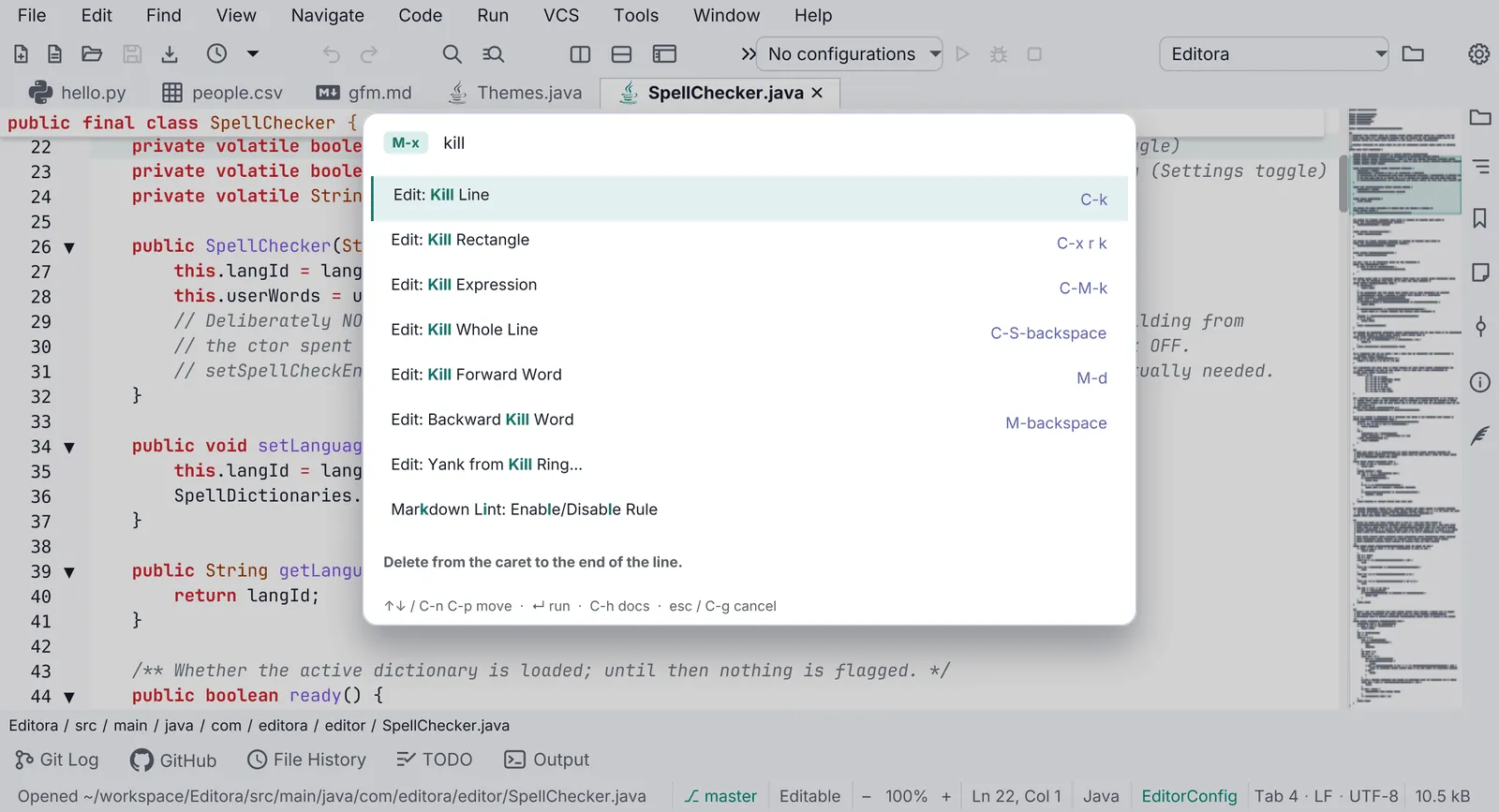
| QOPEN-05 | SHOULD | Typing in a picker ranks its rows by fuzzy score, and ties keep the supplier’s order, so
rows do not shuffle under the cursor between keystrokes.
|
| QOPEN-06 | SHOULD | In a picker, the active keymap’s line and page chords move the selection (in Editora, the
chords of its nav.lineDown, nav.lineUp, nav.pageDown and nav.pageUp commands), as do ↑ ↓, Page Up/Down and
Ctrl+Home/Ctrl+End (Cmd on macOS), which always work; plain Home and End stay with the field’s caret. Enter
or a click on a row chooses; the card hides first, then the choice runs, so focus is already back where it
belongs.
|
| QOPEN-07 | SHOULD | The active keymap’s cancel chord, Esc or a click on the scrim cancels a picker, and the
overlay host restores focus. In Editora the chord is that of its edit.cancel command, C-g in the Emacs
keymap. A picker that previewed something undoes it.
|
| QOPEN-08 | MAY | A picker previews the highlighted row as the selection moves and undoes the preview on cancel
(Editora’s Recent Locations shows each place and returns to the origin on Esc). A preview without an undo is
worse than none, and nothing is previewed for the row the picker opens on, only for one the user moved to.
Editora’s theme and keymap pickers do not preview; they apply on Enter.
|
| QOPEN-09 | MAY | A row action acts on the highlighted row and keeps the picker open (Editora’s breakpoints
picker enables or removes one), re-reading the list afterwards and keeping the cursor in place.
|
| QOPEN-10 | SHOULD | A picker that can open on an empty list shows a placeholder sentence in it, never a blank
card. A picker with nothing to offer may instead say so in the status line and not open.
|
| QOPEN-11 | SHOULD | The overlay host a picker shows in holds one card at a time; opening a picker replaces
whatever card was up.
|
| QOPEN-12 | SHOULD | A picker’s relatives, the other list overlays an app has (in Editora the open-files
switcher, the find-file field, the multi-select picker, and the branch and stash popups), move, accept and
cancel with the same keys as the picker.
|
- QOPEN-01 SHOULD One picker serves every list choice: recent files, themes, keymaps, a setting’s values, a
branch to compare with.
- Check (code): those choices are instances of one generic picker class; there is no second list-picker class or
ChoiceDialogfor them. - Reference: Editora
ui/QuickOpen.java(one generic class, instantiated more than seventy times), driven byPickerKeys. Editora still asks with aChoiceDialogin three places: the Git reset mode and the merge parent to revert against (ui/GitWindowCoordinator.java), and the settings backup to restore (ui/SettingsResetFlow.java).
- Check (code): those choices are instances of one generic picker class; there is no second list-picker class or
- QOPEN-02 SHOULD In an app with a picker (a card, opened by a command, for choosing one thing from a list
by typing; a Command Palette that lists only commands is not one, and nor is a menu, a combo box or a field’s
completion list), the picker is the palette’s card in the shared in-scene overlay host, with a title naming the
command over the field and a prompt in the field. That it is never a
javafx.stage.Popupis KBD-07.- Check (code): each picker shows its card through the overlay host the palette uses and sets a title and a prompt text.
- Reference: Editora
QuickOpen.setOverlayHost,ui/OverlayHost.java; the page’s Spec. The app template’s pickers (theme, keymap, language, Bind Key) are titled cards of itsui/Picker.javain itsui/OverlayHost.java.
Anatomy
Section titled “Anatomy”- 1Title. The command that opened the picker ("Jump to Recent File", "Set App Theme"), bold 12 px in the muted color. This is what tells the picker apart from the palette, which has no title.
- 2Query field with a prompt per picker: "Type to filter recent files…", "Type to filter themes…". The Emacs caret keys work in it (
TextInputKeymap.installShared). - 3Match highlight. The characters the fuzzy matcher scored, bold in the accent color; the same
MatchText.runsas the palette, so the highlight and the rank never disagree. - 4Selected row. The first match, or with nothing typed the value in force when the picker knows it (
setCurrentItem), so a settings picker opens on the current value. - 5Detail, right-aligned, in the palette's key-chip style (the keyboard color,
-state-key, in Editora): the file's folder, a branch's upstream, "current". It gives way with an ellipsis; the title keeps its width and never wraps. - 6Icon (optional,
setItemIcon): a file-type glyph fromFileIcons. A per-row class marks state (an unsaved buffer in amber). - 7Key legend. "↵ select" plus any row action's key, rebuilt from the active keymap on every showing.
| Property | Value | Reference |
|---|---|---|
| Kind | The palette’s card in the shared in-scene OverlayHost, over the same scrim; never a javafx.stage.Popup | QuickOpen.setOverlayHost, OverlayHost |
| Width | 620 px; a picker may ask for its own width and a minimum number of rows (a registry browser with one entry still gets a roomy box) | DEFAULT_WIDTH, setPreferredSize |
| Rows | 26 px fixed cells; the list hugs its match count, at least 1 row, 12 before it scrolls | CELL_HEIGHT, MAX_VISIBLE, resizeList |
| Title | Bold 12 px, -color-fg-muted, over the field | .command-palette .palette-title |
| Row | Title as matched runs, an optional icon before it, the detail in the palette’s key-chip style, -state-key in Editora | ItemCell, .keybinding |
| Legend | 11 px muted under the list | .command-palette .palette-hint |
| Card | -color-bg-overlay, radius 12, 1 px -color-border-default, padding 6: the palette’s | .command-palette |
| Ranking | FuzzyMatch over the search key (the label unless the picker names another, a note’s body for instance); equal scores keep the supplier’s order | filter |
Behavior
Section titled “Behavior”Applies to: an app with a picker: a card, opened by a command, for choosing one thing from a list by typing (a Command Palette that lists only commands is not one, and nor is a menu, a combo box or a field’s completion list).
- QOPEN-03 SHOULD A picker reads its items fresh on every showing and snapshots them, so typing filters a
stable list. A source that answers late (an outline the language server has not returned yet) has the picker read
its items again and keep the query (
reload()in Editora).- Check (code): showing a picker calls its items supplier, and a late source makes the picker read the items
again while it keeps the query (Editora’s
showandreload). - Reference: Editora
QuickOpen.show,QuickOpen.reload.
- Check (code): showing a picker calls its items supplier, and a late source makes the picker read the items
again while it keeps the query (Editora’s
- QOPEN-04 SHOULD With nothing typed, a picker’s list keeps the supplier’s own order (recency for recent
files, document order for symbols), with the current value pre-selected when there is one.
- Check (code): a picker’s empty query passes the items through unsorted and selects the value in force when
the picker was given one (Editora’s
setCurrentItem). - Reference: Editora
QuickOpen.filter,setCurrentItem; the app template’sui/Picker.java(current), whose theme, keymap and language pickers open on the choice in force (PickerFxTest,helpTitleCurrentValueAndTheEnds).
- Check (code): a picker’s empty query passes the items through unsorted and selects the value in force when
the picker was given one (Editora’s
- QOPEN-05 SHOULD Typing in a picker ranks its rows by fuzzy score, and ties keep the supplier’s order, so
rows do not shuffle under the cursor between keystrokes.
- Check (code): the last tiebreak of the picker’s sort is the supplier’s index.
- Reference: Editora
QuickOpen.filter.
- QOPEN-06 SHOULD In a picker, the active keymap’s line and page chords move the selection (in Editora, the
chords of its
nav.lineDown,nav.lineUp,nav.pageDownandnav.pageUpcommands), as do ↑ ↓, Page Up/Down andCtrl+Home/Ctrl+End(Cmdon macOS), which always work; plain Home and End stay with the field’s caret. Enter or a click on a row chooses; the card hides first, then the choice runs, so focus is already back where it belongs.- Check (code): the picker’s key handler moves on the commands the active keymap binds for a line and a page up and down, and on the fixed keys whatever the keymap; the accept path hides the card before it calls the choice handler.
- Reference: Editora
QuickOpen(hide()thenonChoose),PickerKeys.resolve, the only picker that asks the keymap. The app template’sui/Picker.javaasks the keymap the same way, through itsui/PickerKeys.java(resolve), and takesCtrl+HomeandCtrl+End(Cmdon macOS); Mirada’s picker is its palette, whoseui/PaletteKeys.javacarries a fixed table of Emacs chords (EMACS) beside the fixed keys. Termina, Torrenta, Modula and nux have no picker (Uses).
- QOPEN-07 SHOULD The active keymap’s cancel chord, Esc or a click on the scrim cancels a picker, and the
overlay host restores focus. In Editora the chord is that of its
edit.cancelcommand,C-gin the Emacs keymap. A picker that previewed something undoes it.- Check (code): Esc, the chord the active keymap binds to the cancel command, and a press on the backdrop each hide the picker; hiding gives the focus back to the node that had it before the picker opened; and a picker that previewed a row runs its undo when it is dismissed without a choice. A test that asserts the undo is the surest evidence.
- Reference: Editora
OverlayHost(previousFocus; it cancels onPickerKeys.isCancel),QuickOpenPreviewFxTest(dismissingRestoresWhatWasPreviewed). The app template’sui/OverlayHost.javacancels its pickers on Esc, on the scrim and on the keymap’sedit.cancelchord (cancelOn), and gives the focus back; none of its pickers previews anything.Ctrl+Gis fixed in theEMACStable of Mirada’sui/PaletteKeys.java.
- QOPEN-08 MAY A picker previews the highlighted row as the selection moves and undoes the preview on cancel
(Editora’s Recent Locations shows each place and returns to the origin on Esc). A preview without an undo is
worse than none, and nothing is previewed for the row the picker opens on, only for one the user moved to.
Editora’s theme and keymap pickers do not preview; they apply on Enter.
- Check (code): a previewing picker previews from its selection listener once it is showing, never for the row it opens on, restores what it previewed when dismissed, and does not restore after a choice. A test that asserts it is the surest evidence.
- Reference: Editora
QuickOpen.setPreview(onPreview, onCancelled),QuickOpenPreviewFxTest.
- QOPEN-09 MAY A row action acts on the highlighted row and keeps the picker open (Editora’s breakpoints
picker enables or removes one), re-reading the list afterwards and keeping the cursor in place.
- Check (code): a row action’s key runs the action on the highlighted row without hiding the card, and the picker then reads its items again and keeps the cursor on that row. A test that asserts it is the surest evidence.
- Reference: Editora
QuickOpen.addRowAction(key, legend, action),QuickOpenPreviewFxTest(aRowActionActsOnTheHighlightedRowAndKeepsThePickerOpen).
- QOPEN-10 SHOULD A picker that can open on an empty list shows a placeholder sentence in it, never a blank
card. A picker with nothing to offer may instead say so in the status line and not open.
- Check (code): each picker whose source can be empty either calls
setPlaceholderor returns beforeshowwith a status message. - Reference: Editora
QuickOpen.setPlaceholder(BreakpointsPicker);NavigationCoordinator(status.nav.noRecentLocations).
- Check (code): each picker whose source can be empty either calls
- QOPEN-11 SHOULD The overlay host a picker shows in holds one card at a time; opening a picker replaces
whatever card was up.
- Check (code): showing a card in the overlay host removes the previous card before it adds the new one, and
keeps the original focus owner (Editora’s
OverlayHost.show). - Reference: Editora
OverlayHost.show.
- Check (code): showing a card in the overlay host removes the previous card before it adds the new one, and
keeps the original focus owner (Editora’s
- QOPEN-12 SHOULD A picker’s relatives, the other list overlays an app has (in Editora the open-files
switcher, the find-file field, the multi-select picker, and the branch and stash popups), move, accept and
cancel with the same keys as the picker.
- Check (code): each of those overlays moves, accepts and cancels on the keys the picker does: the moves of
QOPEN-06, Enter, and the cancel chord and Esc of QOPEN-07. In Editora each maps its
keys through the helper the picker uses (
PickerKeys), which is one way to hold it. - Reference: Editora
Switcher,FileFinder,MultiSelectPicker,BranchPopup,GitStashPopup.
- Check (code): each of those overlays moves, accepts and cancels on the keys the picker does: the moves of
QOPEN-06, Enter, and the cancel chord and Esc of QOPEN-07. In Editora each maps its
keys through the helper the picker uses (
The relatives: the Open Files Switcher lists tabs in tab order, opens on the current one and closes a file with
C-d or Backspace. FileFinder is the Emacs find-file field with Tab completion. MultiSelectPicker ticks several
rows with Space where exactly one would be wrong. BranchPopup and GitStashPopup are sectioned pickers with their own actions. The app template’s one relative, its tab switcher
(ui/Switcher.java), moves through the same ui/PickerKeys.java and accepts and cancels as its pickers do.
| App | Picked with it | Reference |
|---|---|---|
 Editora | Recent files (with file icons), recent locations (previewed), bookmarks, the structure outline, tool windows, open files, projects, keymap, app and editor theme, spell language, a setting’s values (opened on the current value), branches, tags and commits to compare with, remotes, commit message history, the kill ring, Occur lines, external tools, macros, the debug main class, breakpoints, breakpoint groups, loaded sources and modules, agent models | NavigationCoordinator, EditorSettingsCoordinator, DiffCoordinator, DebugCoordinator, BreakpointsPicker, BreakpointGroups, LoadedSourcesPicker |
 Mirada | Go to bookmark…, Open recent folder…: the palette shown over a list of names with a detail per row and an “open” legend | CommandPalette.Choices, ViewerWindow |
| Termina, Torrenta, Modula, nux | Commands only; profiles and other lists are menus or combo boxes today | CommandPalette in each |
| Key | English |
|---|---|
nav.recentFiles.title / .prompt | Jump to Recent File / Type to filter recent files… |
palette.theme.appTitle, palette.theme.editorTitle / palette.theme.prompt | Set App Theme, Set Editor Theme / Type to filter themes… |
command.keymap.select / palette.keymap.prompt | Keymap: Select… / Type to filter keymaps… |
palette.setting.pick | Type to filter… |
pickerKeys.select, pickerKeys.open, pickerKeys.cancel | {0} select, {0} open, {0} cancel |
switcher.header | Open Files |
A title names the command; a prompt starts with “Type to filter” and ends with an ellipsis. A placeholder says what is
missing and what to do (“There are no breakpoints. Click left of a line number to set one.”,
status.debug.noBreakpoints).
In the apps
Section titled “In the apps”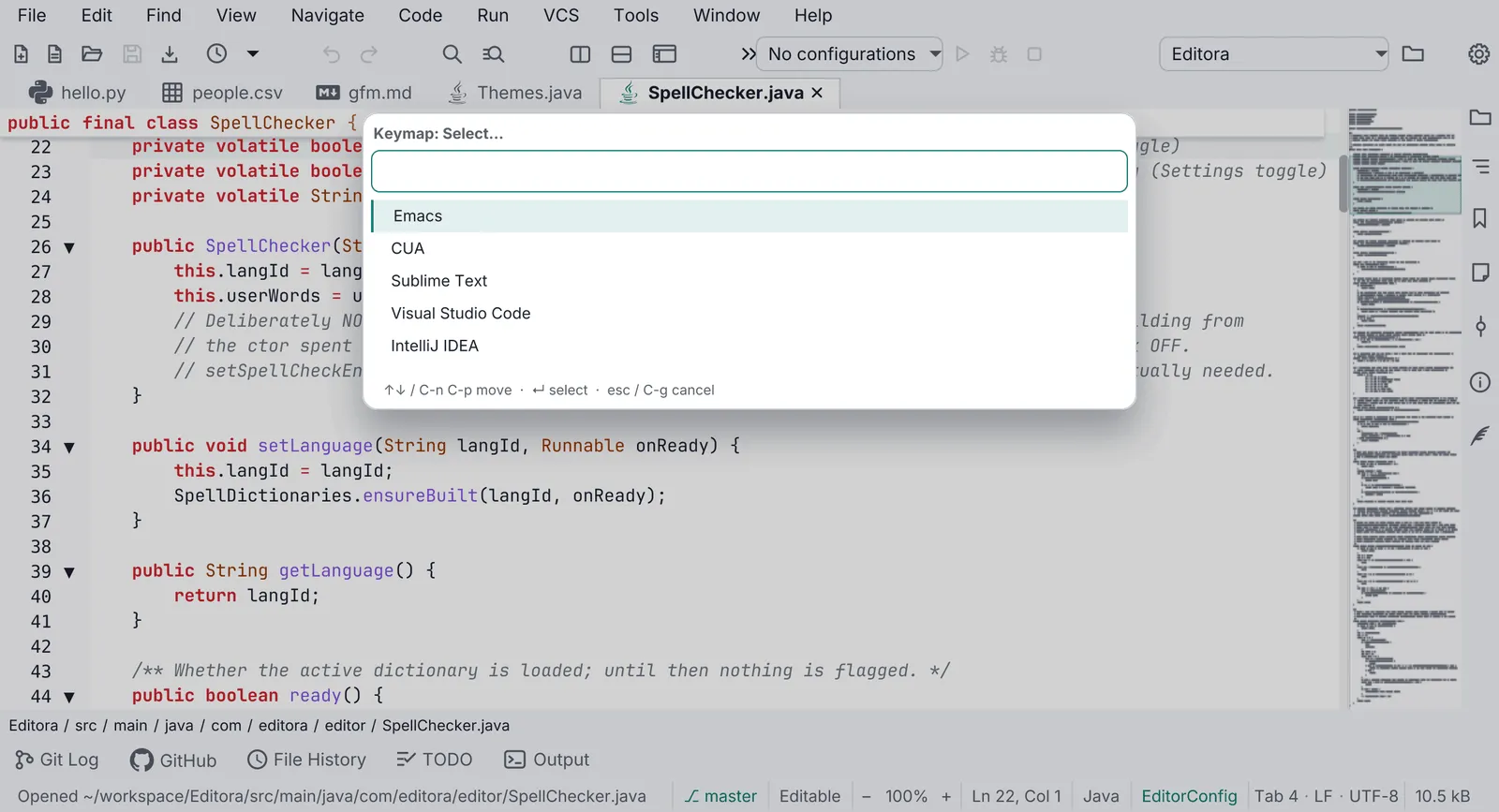
Pauta 6.1.0 · · Changelog · Permanent link to this page in 6.1.0