
Command Palette
MUST in every app. One palette per window, opened by M-x in the Emacs keymaps and
Ctrl/Cmd+Shift+P in the others. It lists every registered command, so a command that exists is a command people
can find. Reference: Editora’s ui/CommandPalette.java; the pure parts (FuzzyMatch, MatchText, PaletteKeys,
TextInputKeys) are shared verbatim with Termina, Torrenta and Mirada.
Anatomy
Section titled “Anatomy”1M-xgit2
4Git: PullC-x v S-=5
Git: PushC-x v S-p
Git: Fetch
3Git: Commit…C-x g
Git: Pull (Rebase)
6Git: Continue Merge / Rebase / Cherry-Pick
Unavailable — no merge, rebase, cherry-pick or revert is in progress.
Git: Stage All Changes
Git: Switch Branch…
7 Pull and merge changes from the remote.
8 ↑↓ / C-n C-p move · ↵ run · C-h docs · Esc / C-g cancel
- 1Opener chip. The chord that opened the palette, read from the active keymap. No chip when the user has unbound it, never a wrong one.
- 2Query field. The first row is the input; there is no title. Prompt "Run command…". Emacs caret keys work inside it.
- 3Match highlight. The characters the fuzzy matcher scored, bold in the accent colour. The highlight and the ranking come from the same call, so they never disagree.
- 4Selected row. Tinted background plus a 2 px accent bar on its inside edge. The bar is what makes the selection readable in a long list.
- 5Key chip. The command's binding in the active keymap, in the keyboard colour (brace periwinkle). Absent when unbound.
- 6Unavailable command. Listed, greyed, never selected and inert to clicks. Its tooltip says why and what to do ("Unavailable — no merge, rebase, cherry-pick or revert is in progress.").
- 7Description. The selected command's
command.<id>.desc, one line with an ellipsis, always one line tall so the card never jumps. - 8Key legend. The palette's own keys, rendered from the active keymap.
| Property | Value | Reference |
|---|---|---|
| Kind | In-scene overlay in the window’s root StackPane, over a faint scrim. Not a javafx.stage.Popup: on Windows a popup does not reliably take keyboard focus. | OverlayHost |
| Width | 620 px | content.setPrefWidth(620) |
| Rows | 36 px high, 8 visible before the list scrolls | ROW_HEIGHT, VISIBLE_ROWS |
| Card | -color-bg-overlay, 1 px -color-border-default, radius 12, padding 6, one wide drop shadow | .command-palette in app.css |
| Row text | 12.5 px; padding 7 × 16 | .command-palette .list-cell |
| Scrim | rgba(0,0,0,0.18); a click on it closes the palette | .overlay-backdrop |
| Content | Every registered command: title from command.<id>, description from command.<id>.desc | CommandRegistry, MessagesTest |
| Ranking | Fuzzy score over title, id and description; a query that names a title outranks a fuzzy hit | FuzzyMatch, titlePhraseScore |
Behaviour
Section titled “Behaviour”- Open: the
palette.showcommand, from its chord or a menu item. The query starts empty and lists every command. - Type to filter; the first enabled match is selected.
- Move: ↑ ↓,
C-nC-p, Page Up/Down. Run: Enter, or a click on an enabled row. The palette closes first, then the command runs. - Cancel: Esc,
C-g, or a click on the scrim. Focus returns to where it was. - Docs:
C-h(or the first free chord ofC-h,F1,Shift+F1in the active keymap) opens the selected command’s page on the website, for the running version. - A live keymap switch re-renders the chips, the opener and the legend.
| Key | English |
|---|---|
palette.prompt | Run command… |
palette.disabled.<reason> | Unavailable — what is missing. What to do first. |
In the apps
Section titled “In the apps”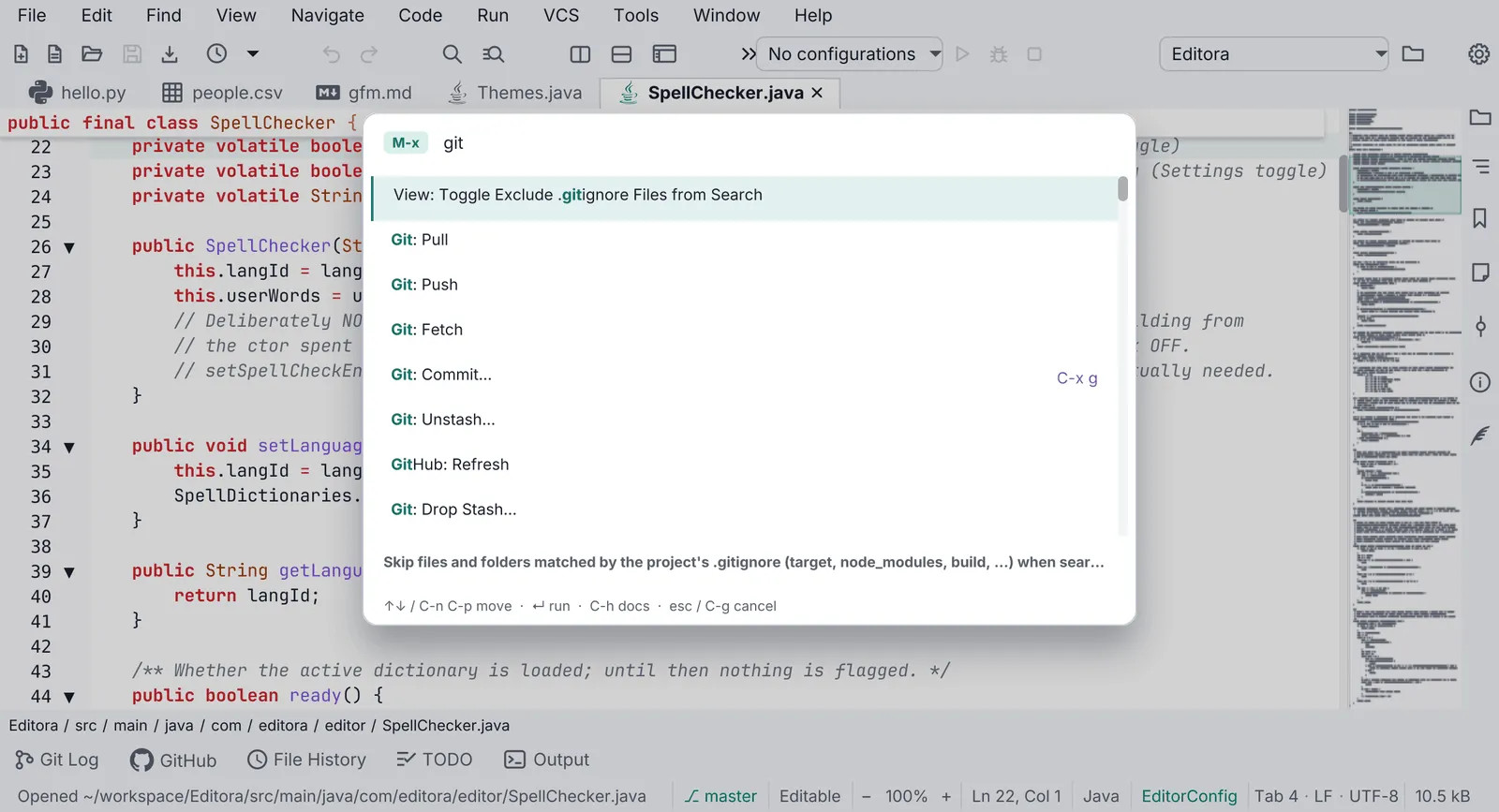
Pauta 1.1.0 · · Changelog